• OGame Nexus v1.2.3 — Changelog & ToolDev Compliance Declaration

    1. New Features & Telemetry Additions

    🔹 Feature 1: Multi-Page Message Scanning (Expeditions, Lifeform Discoveries, Combat Reports)

    • User Perspective: When the player opens their Expeditions, Lifeform Discoveries, or Combat Reports tab, pending message pages are imported and displayed directly without requiring manual pagination clicks.
    • Information Accessed: window.ogame.messages.content & standard in-game message text, loot amounts, fleet losses, and discovery results.
    • Information Source: OGame’s standard message HTML response (page=messages).
    • Requests / Polling: Triggered only upon user navigation to the messages tab; no continuous background polling.
    • External Transmission: None. All parsed records are saved exclusively in local browser storage (IndexedDB).
    • Automated Actions: None. No automatic message deletion, sending, or interactions.
    • Workflow Impact: Read-only display convenience; does not bypass or automate gameplay.

    🔹 Feature 2: Full Moon Synchronization

    • User Perspective: Synchronizes moon resources, stationed fleets, defenses, lunar base levels, sensor phalanx, jump gates, and active item boosters alongside planet data.
    • Information Accessed: Fetch APIs, building levels, stationed ship/defense quantities, and resource totals on the player's own moons.
    • Information Source: Existing OGame planet/moon sidebar DOM elements and standard user-initiated empire sync (component=overview / page=ingame).
    • Requests / Polling: Runs only during user-initiated or active navigation syncs (throttled).
    • External Transmission: None. All data remains strictly local.
    • Automated Actions: None. Purely informational.
    • Workflow Impact: Extends dashboard overview visibility to include lunar infrastructure.

    🔹 Feature 3: Production % & Crawler Settings Scraper

    • User Perspective: Accurately calculates metal, crystal, deuterium, energy, and crawler production yields inside the Nexus Terminal Production tab when percentage sliders (e.g. 150% crawler overload) are adjusted.
    • Information Accessed: Production percentage values (0% to 150%) for mines, solar plant, fusion reactor, solar satellites, and crawlers.
    • Information Source: In-game Resource Settings page (component=resourcesettings).
    • Requests / Polling: None; scraped directly from the active DOM when the player visits the Resource Settings page.
    • External Transmission: None.
    • Automated Actions: None. No automatic changing of slider settings.
    • Workflow Impact: Read-only math calculation for production yield display.

    🔹 Feature 4: Live In-Game Queue Countdowns & Timer Offset Calibration

    image.png

    • User Perspective: Displays live countdown timers on active construction and research queues in the Amortization dashboard, synchronized with server time.
    • Information Accessed: Completion timestamps and item names from the player's active construction queues.
    • Information Source: OGame AJAX production queue component (component=productionqueue).
    • Requests / Polling: Throttled (1-minute cooldown), triggered on page load.
    • External Transmission: None.
    • Automated Actions: None.
    • Workflow Impact: Read-only display of countdown timers.

    🔹 Feature 5: Overseer Mouse Wheel Navigation & In-Game Changelog Tab

    image.png

    • User Perspective: Allows scrolling mouse wheel over the Overseer alert bar to cycle through informational reminders, and adds an in-game "Changelog" tab to the Messages interface.
    • Information Accessed: Local extension changelog text and cached alert list.
    • Information Source: Extension internal package files.
    • Requests / Polling / External Transmission: None.
    • Automated Actions / Workflow Impact: Pure UI/visual navigation only.

    2. Bug Fixes & Refactoring (Summary)

    • Direct Bounty Breakdown: Added missing Trader encounters, navigation delays/speedups, discovered items, and combat reports into the expanded Direct Bounty view.
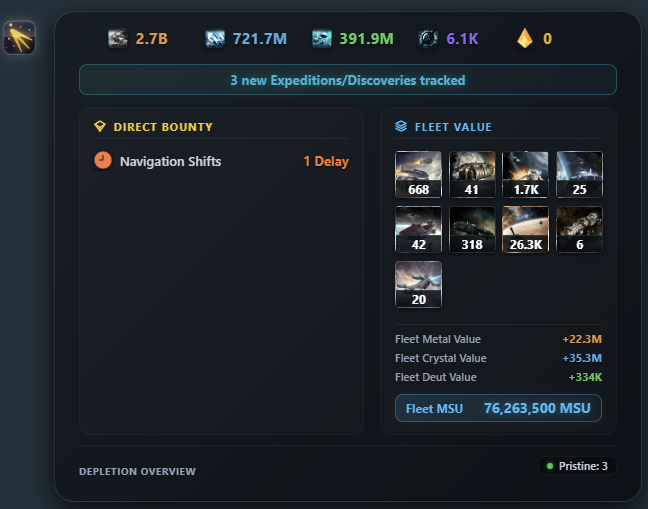
    image.png

    • Cross-Account Speedup Isolation: Resolved inventory leakage across multiple account tabs.
    • Rolling Daily Yield: Added dynamic divisor for accounts with fewer than 7 days of tracked data.
    • Service Worker Bridge: Added retry backoff to handle background service worker wake-up latency.

  • OGame Nexus — Changelog v1.2.5

    📌 Summary of Release

    This update introduces the closed beta test for the alliance collaboration suite (Nexus Overwatch), adds an offline Research Time Optimizer to the dashboard, and includes refinements to the Costs Planner, visual compatibility improvements, and asset updates.

    Feature 1: Nexus Overwatch (Closed Beta Testing)

    Notice: Nexus Overwatch is currently in Closed Beta for internal testing within select alliance testers and is not yet open to the general public.
    • What the feature does from a user perspective:

      Allows authorized alliance members to collaborate by sharing empire statistics (building levels, fleet counts, research, and production yields with customizable privacy sliders) and viewing combined galaxy intelligence (scanned solar system coordinates, activity timestamps, and inactive planet lists).
    • What information it accesses or collects:
      • The player’s own planet/moon coordinates, facility levels (robotics, shipyard, research lab, phalanx, jump gate), lifeform building levels, and active character class bonuses (only what the user chooses to share via privacy settings).
      • Galaxy coordinates, player names, alliance tags, player status indicators (inactive, vacation), and debris field sizes when viewing the galaxy.
      • Basic summary data from espionage messages (resources and fleet counts) opened by the player.
    • Where that information comes from:
      • Standard in-game pages viewed manually by the player (Empire view, Galaxy page, and Messages tab).
      • Official public Gameforge universe API XML files (for baseline server slot data).
    • Whether new background requests, polling, or automated data collection are introduced:
      • No automated page scraping or polling of Gameforge servers. Data is collected strictly when the player manually navigates to a page in their browser.
      • The newly requested alarms browser permission is used solely as a local background timer to sync cached data between the extension and the alliance database at regular intervals.
    • Whether any information is transmitted to external services or databases:
      • Yes. Shared alliance data (scanned galaxy coordinates, player activity timestamps, and empire stats chosen by the user) is encrypted and sent to a dedicated Cloudflare Worker backend and stored in a secure Cloudflare D1 database.
      • No account credentials, passwords, or Gameforge session cookies are ever accessed or sent.
    • Whether the feature performs automated actions, notifications, alarms, webhooks, or similar functionality:
      • No automated gameplay actions. The tool cannot click buttons, build buildings, send fleets, or interact with the game on behalf of the player.
      • It does not trigger automated in-game alerts or external webhooks.
    • Whether the feature changes, shortcuts, or replaces parts of the normal OGame user interface or workflow:
      • Does not replace or automate any standard gameplay workflows or fleet dispatch screens.
      • Displays a non-intrusive alliance badge next to alliance mates in the galaxy view and adds a top navigation shortcut button leading to the standalone Nexus dashboard.

    Feature 2: Research Time Optimizer

    • What the feature does from a user perspective:

      An offline planning calculator that shows exact research completion times and calculates the most resource-efficient upgrade path between Research Labs and the Intergalactic Research Network (IRN).
    • What information it accesses or collects:

      Existing research lab levels across planets and current research levels.
    • Where that information comes from:

      Previously cached local browser storage from standard manual page visits, or manual user input.
    • Whether new background requests, polling, or automated data collection are introduced:

      No.
    • Whether any information is transmitted to external services or databases:

      No. All calculations run strictly inside the player's local browser.
    • Whether the feature performs automated actions, notifications, alarms, webhooks, or similar functionality:

      No.
    • Whether the feature changes, shortcuts, or replaces parts of the normal OGame user interface or workflow:

      No. Functions strictly within the standalone Nexus dashboard.

    🔧 Bug Fixes & Adjustments

    • Costs Planner & Production Yield Engine: Refined payback period (ROI) and amortized yield calculations for mine upgrades, accounting for plasma tech, server speed formulas, and lifeform production bonuses. All calculations run strictly locally with zero external network traffic.
    • Visual Compatibility: Resolved visual styling conflicts with popular third-party extensions (e.g., OGLight) in the galaxy view.
    • Asset Upgrades: Updated high-resolution icons for lunar facilities, jump gates, and lifeform buildings.
    • Storage Optimization: Improved IndexedDB local caching routines for faster dashboard loading times.

  • OGame Nexus — Version 1.2.6 Changelog


    Feature 1: Multi-Account Support & Isolation

    • What the feature does from a user perspective: Allows players who play on multiple universes or accounts to switch between them seamlessly in the extension dashboard. Each account maintains separate local data, settings, and alliance connections. In-game page views (galaxy, empire, messages) automatically recognize which account is active and never mix data across accounts.
    • What information it accesses or collects: The universe identifier and player ID.
    • Where that information comes from: Existing standard page meta tags (ogame-universe and ogame-player-id) and the local browser database.
    • Whether new background requests, polling, or automated data collection are introduced: No. No new requests or polling are introduced.
    • Whether any information is transmitted to external services or databases: No. Account organization and separation take place entirely within the user's local browser database.
    • Whether the feature performs automated actions, notifications, alarms, webhooks, or similar functionality: No automated actions are performed.
    • Whether the feature changes, shortcuts, or replaces parts of the normal OGame user interface or workflow: No. It operates strictly within the extension's standalone dashboard.


    Feature 2: Per-Resource Payback Filters (Amortization)

    • What the feature does from a user perspective: Adds filter buttons to the extension's existing Payback Calculator, allowing players to calculate the investment return of building and mine upgrades for individual resources (Metal only, Crystal only, or Deuterium only) in addition to total combined production.
    • What information it accesses or collects: Mine levels and current production rates already saved locally.
    • Where that information comes from: Local browser database, saved when the player previously visited their standard Resource Settings and Supplies pages.
    • Whether new background requests, polling, or automated data collection are introduced: No. All calculations are performed entirely locally on the user's device.
    • Whether any information is transmitted to external services or databases: No.
    • Whether the feature performs automated actions, notifications, alarms, webhooks, or similar functionality: No.
    • Whether the feature changes, shortcuts, or replaces parts of the normal OGame user interface or workflow: No. It is an offline mathematical calculator inside the extension dashboard.


    Feature 3: Circular Universe Distance Calculations

    • What the feature does from a user perspective: Corrects flight distance, flight duration, and fuel consumption calculations for universes that have circular galaxies or circular solar systems enabled.
    • What information it accesses or collects: Server settings for circular topology (donutGalaxy and donutSystem).
    • Where that information comes from: The official public OGame XML server data (serverData.xml).
    • Whether new background requests, polling, or automated data collection are introduced: No. Uses server settings already fetched during extension initialization.
    • Whether any information is transmitted to external services or databases: No.
    • Whether the feature performs automated actions, notifications, alarms, webhooks, or similar functionality: No.
    • Whether the feature changes, shortcuts, or replaces parts of the normal OGame user interface or workflow: No. Mathematical calculation used within the extension's planner.


    Feature 4: Sensor Phalanx Coverage Map [Closed Beta]

    • What the feature does from a user perspective: Displays a map showing which solar systems are within scan range of participating alliance moons with active sensor phalanxes, helping alliance members identify coverage and blind spots.
    • What information it accesses or collects: Alliance moon coordinates and sensor phalanx building levels.
    • Where that information comes from: Empire information voluntarily shared by participating alliance members who explicitly opt in to the feature.
    • Whether new background requests, polling, or automated data collection are introduced: No automated background polling. Data is retrieved only when the user deliberately opens this view in the dashboard.
    • Whether any information is transmitted to external services or databases: Moon coordinates and sensor phalanx levels of opted-in members are retrieved from the alliance's secure cloud database.
    • Whether the feature performs automated actions, notifications, alarms, webhooks, or similar functionality: No automated actions.
    • Whether the feature changes, shortcuts, or replaces parts of the normal OGame user interface or workflow: No. It is an informational visualization map in the extension dashboard.


    Feature 5: Universe Intel Unread Counter [Closed Beta]

    • What the feature does from a user perspective: Displays a small unread number badge on the Universe Intel tab in the extension dashboard so players know if new alliance activity events have occurred since they last checked the tab.
    • What information it accesses or collects: The timestamp of when the player last opened the Intel tab.
    • Where that information comes from: Local browser storage.
    • Whether new background requests, polling, or automated data collection are introduced: No new requests.
    • Whether any information is transmitted to external services or databases: No.
    • Whether the feature performs automated actions, notifications, alarms, webhooks, or similar functionality: No. Purely a visual badge inside the extension interface.
    • Whether the feature changes, shortcuts, or replaces parts of the normal OGame user interface or workflow: No.


    Bug Fixes & Refactoring

    • Interface Stability: Added isolated error boundaries to each dashboard view to ensure a rendering error in one view never affects the rest of the application.
    • Alliance Comparison Guard: Fixed an issue where the 1-on-1 member comparison view would fail if fewer than two members were selected.
    • Highscores Refresh: Fixed an issue where player highscore rankings did not refresh when changing selected players in the comparison view.
    • Galaxy Event Filtering: Refined galaxy activity detection to prevent false status notifications on abandoned planets and accounts in vacation mode.

  • OGame Nexus — Tolerated Tools Update Log


    Version 1.2.8

    🚀 New Features

    1. Overwatch Universe Baseline Map (Closed Beta)

    • What it does: When a player creates a new alliance Overwatch network, the map starts with public galaxy coordinates, planets, and player tags already visible.
    • Information accessed/collected: Public galaxy coordinates, planet names, player names, and alliance tags.
    • Source of information: Official Gameforge public universe XML feeds (serverData.xml, universe.xml, players.xml, alliances.xml).
    • Background requests / polling: A one-time initial download of public Gameforge XML data by the sync server when a new alliance network is created. No background polling or in-game client requests.
    • Transmitted to external services: Public universe coordinates are stored on the alliance network database for member map viewing.
    • Automated actions / alarms / webhooks: None.
    • Changes / shortcuts / replaces OGame UI: None. Only displayed inside the extension's Overwatch Universe Map tab.

    2. In-Game Overwatch Access Request & Alliance Setup

    • What it does: Allows players without an alliance network to request Closed Beta access directly in-game, and allows leaders to customize their alliance tag during setup.
    • Information accessed/collected: In-game player name, universe ID, chosen alliance tag, and optional user notes.
    • Source of information: User input in the request form and universe ID from the current page URL.
    • Background requests / polling: A single request sent only when the player clicks the "Submit Request" button. No background polling.
    • Transmitted to external services: Sent to the developer backend and posted to an admin Discord channel to verify and approve beta whitelist access.
    • Automated actions / alarms / webhooks: Webhook notification to the developer team Discord for access review.
    • Changes / shortcuts / replaces OGame UI: Adds an access request form inside the extension's Overwatch onboarding screen. Does not alter any native OGame page or workflow.

    3. Redesigned Update Center Support Banner

    • What it does: Replaces the old bottom donation box with a compact, expandable top banner inside the extension's Update Center tab, showing links for optional donations and official Gameforge partner registration.
    • Information accessed/collected: None.
    • Source of information: Static extension text and links.
    • Background requests / polling: None.
    • Transmitted to external services: None.
    • Automated actions / alarms / webhooks: None.
    • Changes / shortcuts / replaces OGame UI: Displays only inside the extension's custom "OGNexus" tab in the in-game message board. Does not modify native OGame message tabs.

    🛡️ Bug Fixes & Adjustments

    • Costs Planner multi-account cloud sync: Fixed an issue where shopping cart items from one account could mix into another account during cloud backup. Carts are now strictly kept separate per player.
    • Costs Planner lifeform levels: Building calculations now correctly read your planet's actual lifeform levels instead of test defaults.
    • Building & research names: Corrected translated names across all 12 languages to match official in-game names.
    • Language selection: Fixed language settings to update instantly and remember user selection across sessions.


    Version 1.2.7

    🚀 New Features

    1. Multi-Language Support (12 Languages)

    • What it does: Allows players to switch the extension interface between 12 languages (EN, DE, FR, RO, PL, NL, ES, IT, RU, TR, PT, PT-BR).
    • Information accessed/collected: Selected language preference.
    • Source of information: User selection via dropdown or automatic detection from server link.
    • Background requests / polling: None.
    • Transmitted to external services: None (stored locally in browser storage).
    • Automated actions / alarms / webhooks: None.
    • Changes / shortcuts / replaces OGame UI: Adds a small language dropdown to the extension header and update tab. Does not change native OGame interface or workflow.

    2. Costs Planner: All-Planets Upgrade & Cart Editing

    • What it does: Adds convenience calculation buttons to add building upgrades across all colonies at once, and allows editing target levels directly in the planner cart.
    • Information accessed/collected: Current building levels and user-selected target levels.
    • Source of information: Existing locally cached planet data from normal page visits, and user clicks.
    • Background requests / polling: None.
    • Transmitted to external services: None (or optional private cloud vault if user enabled cloud sync).
    • Automated actions / alarms / webhooks: None. No automated building or game interaction.
    • Changes / shortcuts / replaces OGame UI: Extension dashboard calculation tool only. Does not automate or alter in-game building queues.

    3. Astrophysics Payback Calculator

    • What it does: Calculates estimated payback time and return on investment for unlocking new colony slots through Astrophysics in the Amortization tool.
    • Information accessed/collected: Current mine levels, daily production numbers, and Astrophysics tech level.
    • Source of information: Existing locally stored empire statistics.
    • Background requests / polling: None.
    • Transmitted to external services: None.
    • Automated actions / alarms / webhooks: None.
    • Changes / shortcuts / replaces OGame UI: Client-side math displayed only inside the extension dashboard.

    4. Scrap Merchant Calculator Update

    • What it does: Previews estimated resource returns when scrapping ships and defense, including fleets currently in flight.
    • Information accessed/collected: Fleet and defense counts.
    • Source of information: Locally cached empire fleet data.
    • Background requests / polling: None.
    • Transmitted to external services: None.
    • Automated actions / alarms / webhooks: None. Does not interact with or automate the in-game Scrap Merchant.
    • Changes / shortcuts / replaces OGame UI: Extension dashboard display only.

    🛡️ Bug Fixes & Adjustments

    • Sensor Phalanx display: Fixed moon count and sensor scan range radius calculation on circular universes.
    • Overwatch live feed: Corrected alerts for new colonies, moons, and player class tags.

  • OGame Nexus — Update v1.2.9 Changelog


    Feature 1: Note Taking for Coordinates and Players

    • What it does: Allows players to click any slot position number in the galaxy view to open a notes window where they can write, tag, view, and delete personal notes for that coordinate or player.
    • Information accessed/collected: Note text entered by the user, selected note tag, and the target coordinate and player name.
    • Source: User input and text already displayed on the open galaxy page.
    • Background requests / polling: None. Operates only on click.
    • External transmission: None by default (saved locally in browser storage). Can only be synced if the user manually triggers their private Vault backup in settings.
    • Automated actions / alarms / webhooks: None.
    • UI/Workflow changes: Makes the slot numbering column in the galaxy view clickable and displays a subtle accent on numbers that have saved notes. Does not replace or shortcut any game actions.


    Feature 2: Alliance Top & Flop of the Day

    • What it does: Provides a 24-hour score progression overview for alliance members (showing top gainers and drops) inside the extension dashboard, with an option to generate a shareable image card for Discord.
    • Information accessed/collected: Public highscore points and member rosters.
    • Source: Official Gameforge public universe XML API (api/highscore.xml and api/alliances.xml).
    • Background requests / polling: No game polling from the user's browser.
    • External transmission: Sends alliance ID and universe ID to fetch public score calculations from the backend.
    • Automated actions / alarms / webhooks: Allows the user to share the generated summary card to a Discord webhook if configured. No automated game actions.
    • UI/Workflow changes: Adds a dedicated rankings view inside the extension dashboard. Does not modify in-game pages.


    Feature 3: Empire Daily Yield Customizations

    • What it does: Allows players to toggle which resource sources (mines, plasma technology, lifeforms, booster items) to include in their daily empire yield estimates and adjust the scrap recovery percentage slider.
    • Information accessed/collected: User configuration settings (checkbox states and slider percentage).
    • Source: Direct user input inside the dashboard.
    • Background requests / polling: None.
    • External transmission: None (calculated 100% locally).
    • Automated actions / alarms / webhooks: None.
    • UI/Workflow changes: Adds filter checkboxes and a slider inside the extension dashboard empire view. Does not alter game pages.


    Feature 4: Universe Map to Heatmap Deep Links

    • What it does: Allows clicking player names or coordinates within the extension's Universe Map to navigate directly to their activity heatmap view.
    • Information accessed/collected: Player ID and coordinates.
    • Source: Already-cached galaxy data stored locally from past browsing.
    • Background requests / polling: None.
    • External transmission: None.
    • Automated actions / alarms / webhooks: None.
    • UI/Workflow changes: Dashboard-only navigation link. Does not alter the game interface.


    Bug Fixes & Compatibility Adjustments

    • Multi-Extension Compatibility: Corrected activity marker and status tag reading in the galaxy view when running alongside other tools like OGLight to prevent display errors.
    • In-Game Changelog Tab: Added a one-time "NEW" badge on the in-game Nexus tab inside the Messages menu that disappears after being clicked.