Posts by Dalinar

    OValue — Update

    Since the Production Planner was introduced it has grown a lot, the calculations are now closer to OGame, and

    syncing with the game is more reliable and easier to troubleshoot. Here is what changed.


    Production Planner

    - Spending goal: besides a production target, you can now set something to buy (e.g. Astrophysics 31) and the

    planner finds the plan that reaches it with the fewest packs overall, with the cost in euro.

    - Collector Enhancement (Rock'tal T18) is now considered: it gives no metal directly but boosts the Collector class

    bonus and crawlers, and the planner measures its real gain on your account.

    - Per-research Lifeform selection: choose exactly which researches the planner may use; the ones already active in

    your profile are pre-selected and the choice is saved per profile.

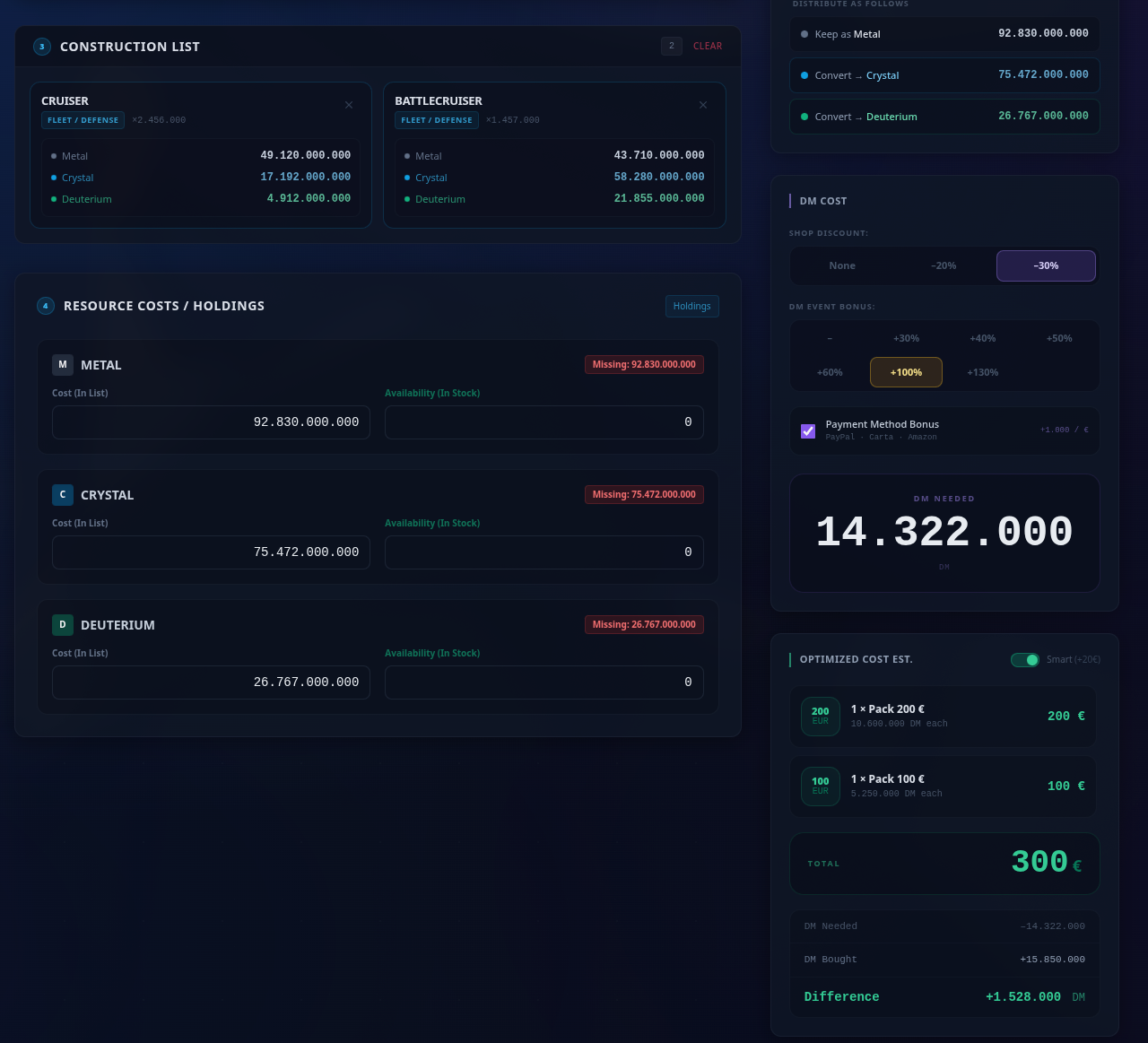
    - Resources you already own, shop discount and DM bonus are in the form and lower the packs needed, just like in

    Pack Exchange.

    - Grouped steps now show the names of the planets to upgrade, and only identical level jumps are grouped together.

    - Steps are ticked automatically when your synced data shows them done, with the remaining cost always visible;

    completed planets are highlighted inside each block.

    - "Recalculate the rest" and "New plan" instead of always starting from scratch.

    - The plan is kept per profile when you change page, with a warning if your Production Core data changed after it

    was calculated.

    - Costs shown in MSU and per resource; clearer summary and more readable roadmap.


    Production Core

    - Production now matches OGame exactly: the bonus is no longer rounded planet by planet (checked against the

    in-game Metal Pack value of a real account).

    - Lifeform research bonus fixed: only the research-amplifier buildings of the active species count, and the manual

    total is no longer added on top of the bonus calculated from researches.

    - New Resource Amplifier field (15/20/25/30/40%) per planet, with bulk editing.


    Pack Exchange

    - New Lifeform settings panel (Mineralogy Center, LF Research Lab) for the cost reductions.

    - Thousands separator in the fleet quantity field.

    - Fixed dropdowns that sometimes closed and reopened by themselves.


    Shopping List

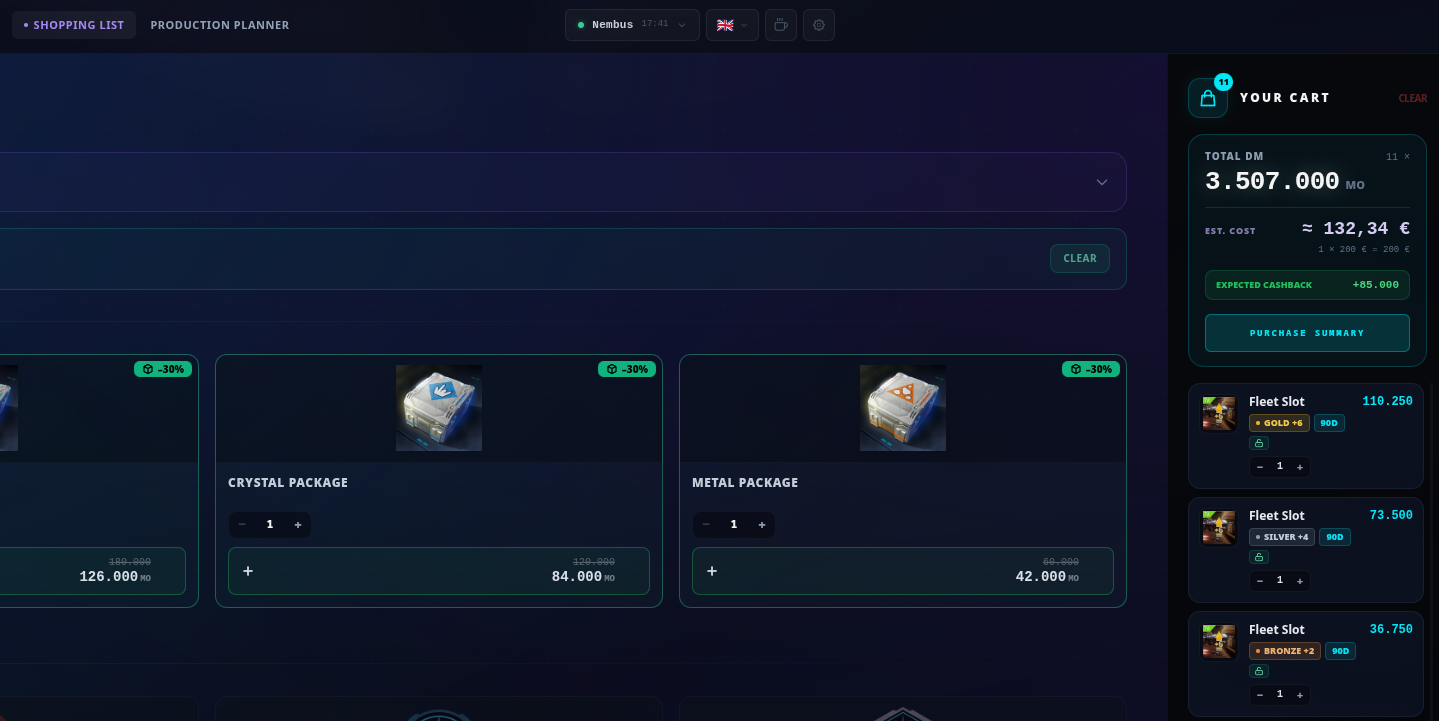
    - New layout with event icons and item search.

    - Dark Matter package selector (event bonus and payment method bonus) with an estimate in euro of your cart.

    - New items with icons: Resource and Expedition Amplifiers, Expedition Computer, scrap dealer offers. They are

    unique items, so no more "Bronze" label.

    - Discount events (including Platinum) now cover the new items.

    - Cart total moved to the top and easier to read.


    Sync and Exporter

    - The exporter now reads your account from the official data OGame provides on v13: Lifeform researches, alliance

    class and amplifiers are picked up just by opening the Overview.

    - Instant updates: with OValue open in another tab, new data reaches it immediately, without reloading.

    - New Sync Diagnostics in Settings: exporter status, a log of every sync with errors in clear text, and a button

    that copies a full report to paste when you ask for help.

    - Blocked servers (universes whose profile you deleted) can now be relinked to an existing profile, or their data

    can be deleted if you no longer play there.

    - Exporter changelog: see the dedicated post.


    Removed

    - Expiry Tracker and global items tracking: rarely used and costly to keep in sync with the game. The exporter no

    longer collects that data.

    - OGame news feed on the home page.

    OValue Exporter — Changelog (3.9.0 → 4.5.2)


    4.5.2

    - New: from OValue (Settings → Sync Diagnostics) you can now delete the data the

    exporter keeps for universes you no longer play. Deletion happens only on your

    explicit request and only affects data stored locally in Tampermonkey.


    schermata-20261024-173724.png


    4.5.1

    - The exporter now reports itself to OValue even when no game data has been collected

    yet. OValue can tell "script not installed / disabled" apart from "script installed

    but Overview never opened", which makes sync problems much easier to diagnose.


    4.5.0

    - The exporter now sends its version and the time the data was collected in-game,

    so OValue can show how fresh your data is and log every sync for troubleshooting.


    4.4.0

    - Instant updates: with OValue already open in another tab, new data collected in

    the game (e.g. after "↻ Refresh Data") reaches OValue immediately, without

    reloading the page.

    - This is local communication between your browser tabs only: no extra requests

    to OGame. Tampermonkey will ask you to approve one new permission

    (GM_addValueChangeListener) when updating.


    4.3.0

    - Removed: global items (fleet/expedition slots, energy/crystal/deuterium boosters…)

    are no longer read or shown. They were only used by OValue's expiration tracker,

    which no longer exists. Metal and resource amplifiers per planet are kept, since

    they affect production.


    4.2.2

    - Fixed: the metal production shown in the panel now matches OGame exactly

    (the per-planet bonus is no longer rounded; only the daily total is, like OGame).


    4.2.1

    - One script only: v4 has been merged into the existing script on Greasy Fork.

    - Fixed: LF research bonus in the panel aligned with the OValue app (only the

    research-amplifier buildings of the active species count).


    4.2.0

    - Resource Amplifier (15/20/25/30/40%) is now filled into OValue's Production Core.

    - Fixed: the Expedition Resource Amplifier was counted as a production bonus.

    It is now ignored for production.

    - Fixed: the Resource Amplifier description could be misread as a Bronze metal

    booster. Items are now recognised by name only.


    4.1.0

    - On OGame v13, active items per planet (metal/resource amplifiers) are read

    from the account data loaded with the Overview: no need to open the Empire page.

    - Crawler overload (150%, Collector only) is read from the Resource Settings page

    when you open it. The panel shows which planets have been read and links to the

    missing ones.


    4.0.0

    - New Production Core inside the panel: your 24h metal production, calculated

    from the planets already collected, without opening OValue.

    - Class simulator: switch between Collector and General/Explorer to see the

    "what-if" production, with absolute and percentage difference.

    - All data collection and export features are unchanged.

    Thank you to the OGame Origin team for granting the toleration for Item Helper.

    As requested, version 1.3.0 adds a notice on premium content, shown on first use.


    Changelog


    1.3.5

    Various fixes and improvements:

    - Time-left badges are now off by default; switch them on in Settings (⚙).

    - Copies of an item with a deadline get their own card, so the quantity and the time left shown always belong

    together.

    - Items that have left the shop (e.g. event items) are no longer offered as buyable; they still show if you own

    them or have them active.

    - "Buy" from the Inventory tab now opens the item in the shop correctly.


    1.3.0

    - First-use notice: the tool works with premium content (items, purchases, Dark Matter activations), so on first use it shows a notice and stays inactive until you press "I understand". You can read it again from the "i" button.

    - Interfaces in a language the tool doesn't support now fall back to English.


    1.2.0

    - Filter chips based on the game's own inventory categories, plus "expiring" and "active".

    - New settings panel (⚙): display options, "expiring soon" threshold and deadline colours.


    1.1.1

    - Time left shown on active items and under officers, on every page.

    - Available in 9 languages: IT, EN, DE, FR, ES, PL, TR, PT, RU.

    - One-click durations: picking a duration now opens that item right away (one click instead of three)

    Status — this build is frozen and not released yet: no further changes are going in, and it stays unpublished until it is cleared for release.


    update 1.1


    New

    • Nine languages — English, Italian, German, French, Spanish, Polish, Turkish, Portuguese and Russian. The language is read from the interface, not from the server, so playing in English on an Italian server (or the other way round) no longer mixes the labels up.


    Fixed

    • Durations take one click. Before you had to press "Activate", pick 7/30/90 days and press again. Picking the duration now opens the game's panel straight away.
    • Different items are no longer merged. Items that only share an effect — a Kraken and its lifeform counterpart — were folded into one card with meaningless "#1 / #2" entries. They are separate cards again.
    • Every control says what it does, with a full sentence on hover and a "?" button holding the same as text. The next-planet button shows the destination coordinates.
    • Reworked look: bigger, more readable buttons and deadlines that stand out.

    ⚠️ Notice: this tool interacts with premium content ⚠️

    This tool interacts with premium content in the game, including items and purchases made with Dark Matter.

    • You use this tool at your own risk. A tolerated tool has been reviewed against the tool rules. Toleration does not mean that Gameforge or the OGame Origin team endorses the tool or guarantees that it works correctly.
    • Always check what you are buying or activating before you confirm it in the game.
    • Gameforge and the OGame Origin team take no responsibility for wrong, duplicate or unintended purchases or activations, or for any Dark Matter or items lost while using this tool. Such purchases will not be refunded or reversed.
    • Report problems with the tool to its author, not to Gameforge support.

    This notice was added by the OGame Origin Team.


    itemhelper.jpg


    Hoarding items because clicking through every planet is a nightmare? Losing them to expiration because a 24-hour warning just isn't enough?

    Item Helper is your solution. It's a targeted QoL script built to make item management, tracking, and activation completely frictionless.


    schermata-20261020-171203.png


    What does this tool do?

    Item Helper opens a new window on the shop.

    This window allows you to quickly search for items from your inventory or the shop (by enabling the flag).


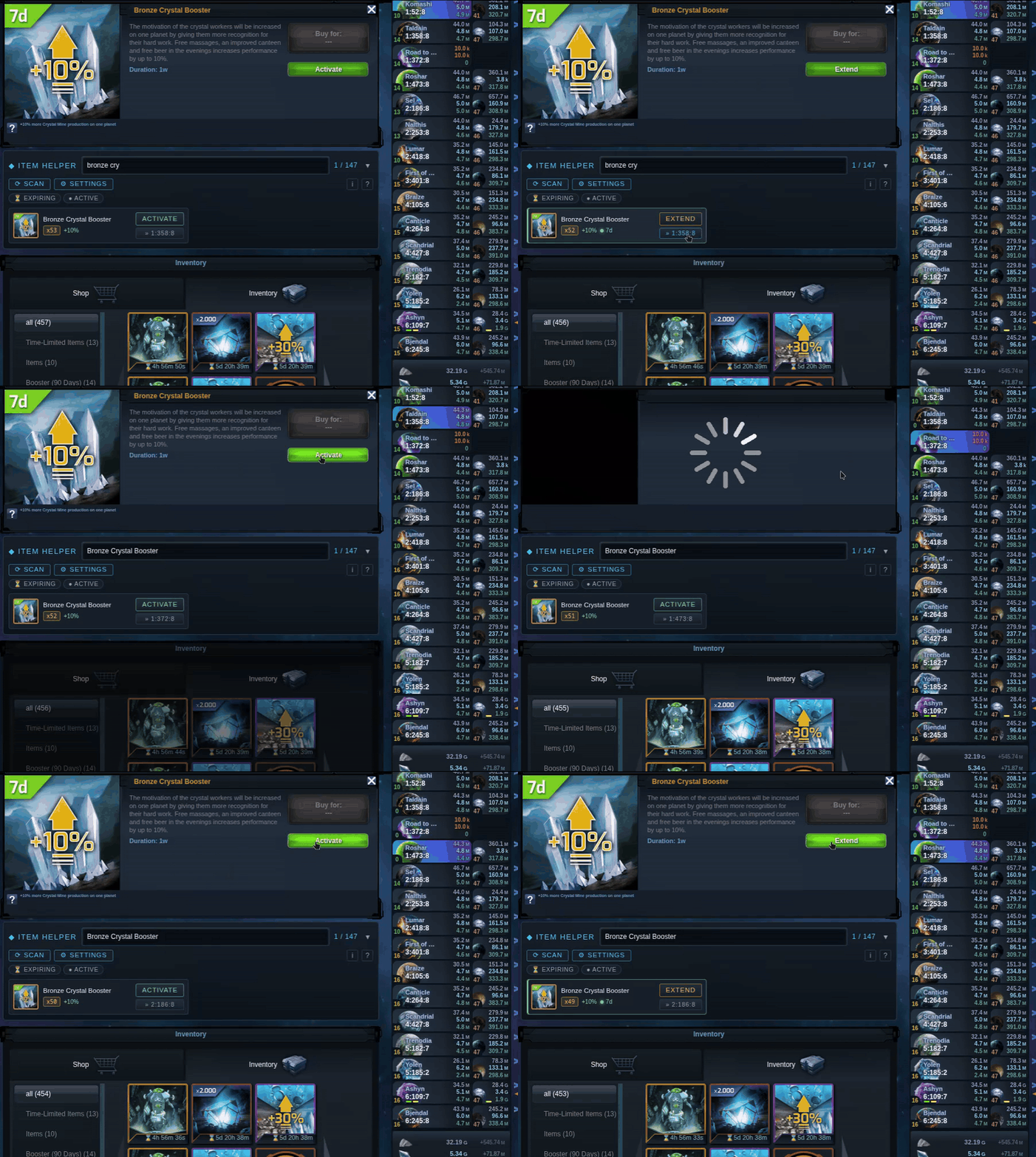
    The "Activate" or "Extend" button takes you directly to the activation or shop, depending on whether you have the item in your inventory or not.

    The ">>" button allows you to move to the next planet with that item selected.

    For example, if I need to activate the 10% metal on all planets, I activate on the first planet and then click on the ">>" button. This automatically takes me to the next planet and the already selected item, ready to activate.


    Items with different formats—7, 30, or 90 days—have a secondary menu (see screenshot below).


    A panel is also active by default in the overview that highlights expiring items.


    How to use it?

    Open OGame and go to the shop page (Merchant -> Shop or Inventory). The panel appears inside the shop.

    First use: open the Shop tab once and the Inventory tab once.

    The game only loads one of the two at a time, and the tool reads what is on screen rather than fetching anything, so this one-off gives it the full picture.

    It is then remembered for 24 hours.

    Optional: press the scan button once to see which items are active on your other planets.


    Information


    Tool Name: Item Helper for OGame

    Current Version: 1.3.5

    Author / Team: Dalinar

    Website / Repository: Greasyfork

    Support / Contact: forum PM, or the issue tracker at https://github.com/nicolagalassi/OGItemHelper/issues

    License: MIT

    Download: Greasyfork


    Tool Classification: Userscript


    Supported browsers / platforms: any desktop browser with a userscript manager (Tampermonkey)


    Language independence


    Works on any community:

    - Items are identified by ref / uuid, never by name. No CSS selector depends on translated text.

    - Own interface texts in nine languages (IT/EN/DE/FR/ES/PL/TR/PT/RU), picked from the language of the game menu;

    English otherwise.

    - Filter chip labels come from the game's own category buttons, already translated.

    - Text is read in three non-critical places only: the duration label of grouped items (item field first, tooltip as

    fallback), the optional account scan (matches buffs by the name the game returns), and the officers' time left

    (from their tooltip). If any of these fails, a neutral label is shown or the badge is skipped.


    Developed and tested on s269-it (v13); anything reported elsewhere will be fixed.


    Tool Description


    Activating an item on several planets means opening the shop, switching to the inventory, scrolling a wall of icons

    with no name search, opening the item, activating, then repeating on the next planet.


    This tool adds a compact, searchable panel to the shop page showing what you own, what is running on the current

    planet and what is about to expire, then hands you over to the game's own item panel. It never activates, extends

    or buys anything: every action is the player pressing OGame's own button.


    Premium-content notice (requested by the OGame Origin team): on first use the shop shows only a notice that the

    tool interacts with premium content. The tool does nothing until the player presses "I understand"; the "i" button

    shows the notice again.


    Features


    Shop page

    - Search by name; filter chips for the game's categories, "Expiring" and "Active", with a "12 / 47" counter that

    clears filters on click.

    - One card per item: thumbnail with tier colour, name, quantity, percentage, time left if active.

    - Shows what you own plus what is active; the "Shop" option adds buyable items.

    - Durations of one item (7d / 30d / 90d) grouped in one card; copies with a deadline get their own card.

    - The button opens the game's native panel (Activate / Extend / Buy), switching tab if needed.

    - "»" opens the same item on the next planet via OGame's own deep link: one click, one navigation.

    - Expiring items sorted to the top; the button targets the copy that expires first.

    - Optional "Scan": one read of the account data, on explicit click only, to see active items on every planet.

    - Contents are remembered in the browser and updated whenever the player opens a tab: used-up items and items gone

    from the shop disappear. After 24 hours the panel asks to open Inventory/Shop again, since event items change

    daily. The tool never switches tab by itself.

    - Settings panel (⚙): display options, sorting, compact grid, expiry threshold and colours, overview reminder,

    time-left badges, stored data.


    Overview page

    - A small notice in the empty strip of the planet banner listing items with a deadline, each linking to the item.

    Placed so it covers no game element; dismissable; built only from locally stored data.


    Every page (off by default)

    - Time-left badges on the active items bar and below the officers' icons.


    API Usage


    One endpoint, only on explicit click of "Scan":


    Code
    1. GET /game/index.php?page=componentOnly&component=externaldataexport&action=accountInfo&asJson=1


    Never on page load, timer or background. Same-origin, credentials included; the rotated newAjaxToken is passed back

    to the page. No cp parameter in background requests.


    Everything else is read from data already in the page (inventoryObj and the shop DOM). No external services.


    UI Modifications


    - Shop: one panel in normal flow between the shop image and the inventory list; small overlays only for the

    duration picker and the Settings window.

    - Overview: one small dismissable notice in the planet banner.

    - Every page, if enabled: small time labels on active items and officers.


    Nothing in the game is hidden, replaced, restyled or removed.


    Screenshots / Demo

    ogitem.gif


    schermata-20261020-171344.png


    schermata-20261020-171249.png


    schermata-20261020-171138.png


    schermata-20261020-171107.png


    schermata-20261020-171533.png


    Installation Instructions

    • Install a userscript manager (Tampermonkey or Violentmonkey).
    • Open the download link above; the manager will offer to install the script.
    • Open OGame and go to the shop page (Merchant -> Shop). The panel appears inside the shop.
    • First use: open the Shop tab once and the Inventory tab once. The game only loads one of the two at a time, and the tool reads what is on screen rather than fetching anything, so this one-off gives it the full picture. It is then remembered for 24 hours.
    • Optional: press the scan button once to see which items are active on your other planets.

    To uninstall, remove the script from the manager. To also clear what it remembered, clear the site data for your OGame server.


    Data Handling / Privacy


    Stored locally: yes, in the browser's own storage for the OGame domain, and nowhere else.

    • localStorage: oih_cache_inv, oih_cache_shop (the inventory and shop item lists, 24h), oih_active_all (result of the manual account scan, 24h), oih_expiring (items with a deadline; entries drop out on their own once the date passes), oih_reminder_off (a single on/off flag).
    • sessionStorage: oih_showShop, oih_collapsed, oih_filter, oih_pending, oih_pendingName - panel state and the item being carried to the next planet.

    Sent to external servers: no. The only network request the script makes goes to the player's own OGame server (the endpoint above). There is no backend, no account, no sync, no third-party host, no remote fonts or images.


    Analytics / telemetry: none. Nothing is counted, reported or transmitted.


    Data never leaves the browser, and everything stored is data the player's own session already had.


    Source Availability


    Open source. A single unminified, commented .user.js file (about 1,200 lines) under MIT, published in full at the repository above. Nothing is bundled, obfuscated or fetched at runtime: the file you install is the file you can read.


    Changelog


    Version 1.0.0 - first public release

    • Added: searchable item panel in the shop, with owned quantity, item percentage, rarity colour and the items active on the current planet.
    • Added: the different durations of one item grouped into a single card with a duration picker.
    • Added: "»" button that opens the same item on the next planet through OGame's own inventory deep link.
    • Added: optional account scan (one endpoint read, on click) showing which items are active on every planet.
    • Added: items with an expiry date are listed with the time left, sorted first, and the card's button targets the copy that expires soonest.
    • Added: expiry reminder on the overview page, placed by measuring the free space in the planet banner, with a checkbox and an "x" to turn it off.
    • Changed: renamed to Item Helper for OGame; all of the tool's own strings and fallbacks are English.
    • Fixed: an item that had been used up kept being listed as owned until the local cache expired. A read of the inventory now replaces what was remembered instead of adding to it.
    • Fixed: a quantity change (for example a stack going from 2 to 1) did not redraw the panel.
    • Fixed: a scanned buff that had expired since the scan still marked its item as active.
    • Removed: nothing.

    1.1.1

    New

    - Time left shown on active items and under officers, on every page (officer artwork is left untouched).

    - Nine languages: IT/EN/DE/FR/ES/PL/TR/PT/RU, detected from the game menu's language.

    - Picking a duration opens that item straight away: one click instead of three.

    - Tooltips on every control and a "?" help panel; the next-planet button shows its coordinates.

    Fixes

    - Items are grouped by name instead of by effect: e.g. a Kraken and its lifeform counterpart are no longer merged

    into a single card.

    Graphics

    - New look: darker blue-grey background, cyan accent, bigger buttons, more visible deadlines.


    1.2.0

    New

    - Filter chips based on the game's own inventory categories, plus "Expiring" and "Active". The counter shows e.g.

    "12 / 47" when something is filtered out; clicking it clears all filters.

    - Settings panel (⚙): shop items, hide expiring, hide active, group durations, compact grid, sorting, "expiring

    soon" threshold and deadline colours.

    Graphics

    - Optional compact grid layout.

    - Customisable deadline colours.


    1.3.0

    New

    - Notice on premium content, requested by the OGame Origin team as part of the toleration. On first use the shop

    shows only a notice that the tool interacts with premium content (items, purchases and activations with Dark

    Matter). The tool does nothing until you press "I understand". The answer is remembered, and the "i" button in the

    box shows the notice again.

    Fixes

    - An interface in a language the tool doesn't support (e.g. Romanian) now falls back to English instead of keeping

    the last language seen.


    1.3.1

    Fixes

    - Fixed bogus filter chips: category labels could be picked up from unrelated page elements, showing chips made of

    resource figures or coordinates. Labels now come only from the game's own category buttons, and labels saved by

    older versions are discarded and learned again.


    1.3.5

    - Various fixes


    Compliance Declaration


    I confirm that this tool:

    • Does not automate gameplay. It never activates, extends or buys an item, and it presses no button of the game. It opens the game's own item panel and stops there; the action is the player's click on OGame's own control. One click equals one action throughout.
    • Does not provide forbidden functionality. No auto-refresh, no polling, no timers hitting the server, no background scheduling, no automatically registered alarms or notifications, no direct probing, no alternative UI replacing the game, no lobby bypass, no imitation of Dark Matter or Commander features, and nothing that blocks, alters or hides the game's monetisation or advertising. The panel is added in normal flow and hides nothing.
    • Does not exceed permitted API usage. One in-game endpoint, only on an explicit player click, never in a loop, never on a timer, with the rotated token propagated and results cached for 24 hours. No cp parameter in any background request. Everything else is read from the page the player already opened.
    • Complies with all current OGame Origin tool guidelines, to the best of my understanding. If a reviewer sees something that should be changed or removed, tell me and I will change it.

    ## Bug Title ️ ----------------------------------------------------------------------------------------------------------------------------------------------------------------------------


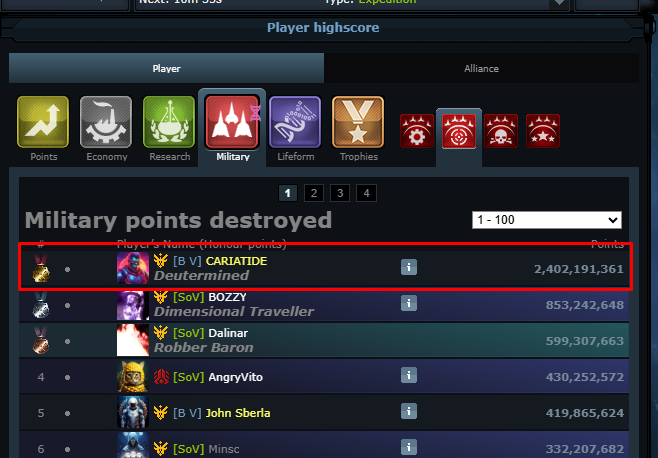
    We've detected a bug in the v13 version on a live server in the military points destroyed ranking.

    Basically, if the battle ends in a draw, not only the defender's points end up in the destroyed points, but also all the points from the attacker's fleet.


    Now, the rankings in our universe are all messed up due to this issue.


    ## Account Nickname/ID ----------------------------------------------------------------------------------------------------------------------------------

    [Dalinar/ 100262] on Nembus server in Italy. s269it


    ## Account Type ----------------------------------------------------------------------------------------------------------------------------------------------------------------------

    [Discoverer]


    ## Device & Environment ---------------------------------------------------------------------------------------------------------------------------------------------------------

    All device, the problem is on the highscore


    ## Steps to Reproduce ------------------------------------------------------------------------------------------------------------------------------------------------------------

    1. attack someone you would have a draw with

    2. At the end of the attack the destroyed points ranking will update with the destroyed points plus all the points of the attacking fleet


    ## Expected Result ------------------------------------------------------------------------------------------------------------------------------------------------------------------

    Only the defender point destroyed should enter in this ranking


    ## Actual Result ----------------------------------------------------------------------------------------------------------------------------------------------------------------------

    At the end of the attack the destroyed points ranking will update with the destroyed points plus all the points of the attacking fleet


    ## Frequency --------------------------------------------------------------------------------------------------------------------------------------------------------------------------

    Always on a draw


    ## Evidence ----------------------------------------------------------------------------------------------------------------------------------------------------------------------------

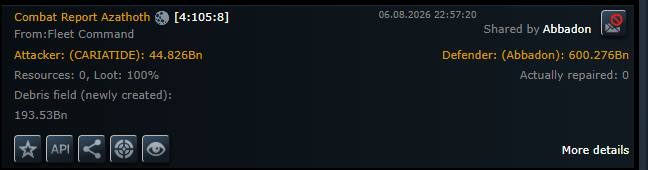
    Attack API: cr-it-269-b6699c9c23dc19e39259cf4d88cc8f36a2155b7d

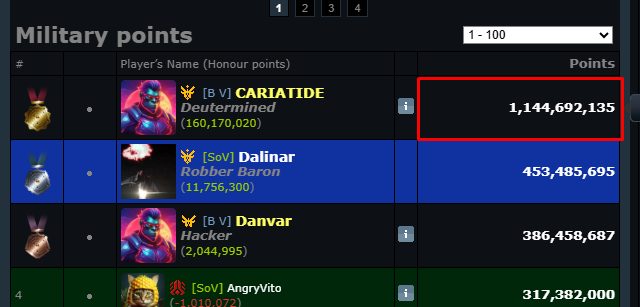
    CARIATIDE points before attack: 643.010.585

    CARIATIDE points after attack: 2.402.191.361


    difference: 1.749.180.776 that is the sum of 600.276.115 (ABBADON'S FLEET) and 1.148.904.661 (CARIATIDE'S FLEET IN ATTACK)


    Screenshot-2.png


    Screenshot-3.png


    Screenshot-4.png


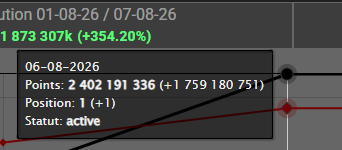
    Screenshot-5.png this is the difference between before the attack and after


    ## Additional Notes -----------------------------------------------------------------------------------------------------------------------------------------------------------------

    please also fix all the battles that have already happened

    🔷 OValue Exporter — Update v3.9.0


    Hi everyone! New version of the OValue exporter, with an important fix for OGame 13:


    🐛 Important fix (OGame v13)

    With OGame version 13, the old method the script used to read mine levels and Lifeform data stopped working. The script now uses OGame's official External Data Export API: it pulls the data for all your planets in a single request, simply by opening the game. More reliable and lighter on the server.


    ✨ New: Alliance Class

    The script now also detects your alliance class (Warrior / Trader / Researcher) and passes it to OValue. If your alliance is Trader, the calculator automatically applies the +5% production bonus. You'll find it in the panel, under the Overview section.

    In

    Hey everyone, I've been working a lot on OValue lately and wanted to share what's new.


    Production Planner

    This is the big one. The planner takes your real account data and calculates the optimal mine upgrade sequence to reach your production target as fast as possible.

    You can set the player class, the lifeform for each individual planet (e.g. Rocktal instead of Humans) and enable LF structure researches.

    For LF researches the planner uses the levels already stored in your synced profile.


    A practical example:

    Quote

    Nick has Mecha with all LF mine researches developed but inactive, and Rocktal with active researches.

    By enabling Rocktal in the planner, the existing levels are used as-is — no need to re-enter anything manually.


    Keep in mind that the more steps you set, the longer the calculation will take. The tool has already been optimized for the best possible speed and reliability, but on large configurations a few seconds of wait time is normal


    Other changes

    • Shopping List redesigned with SVG event icons
    • Added toast notifications and confirm dialogs in settings
    • Revised navigation and home page layout
    • PackCalc: added Lifeforms settings panel
    • Various minor fixes to sync and production calculations

    Sorry for the silence, friends! It's been a while since my last update, but development on OValue hasn't stopped. In fact, there are quite a few improvements and new features to share with you all.

    First off, I'm currently setting up a Discord server. This will be a dedicated place where you can ask questions about how the tools work, report bugs, or point out any inaccuracies.

    As some of you may have noticed, OValue was born out of "vibe coding" (AI-assisted development). While this makes the project much easier for me to manage, I want to assure you that all functionalities are thoroughly tested to guarantee the best possible user experience.

    Here is the breakdown of the latest updates:

    • UI Redesign: OValue has received a major graphical overhaul. The interface is now much cleaner, though I admit I'm still not 100% satisfied with it just yet!
    • Production & Exchange Tools: These two tools have been significantly improved to work much more seamlessly together.
    • Math Fixes: I've implemented and fixed the calculations for the Collector class with the Rocktal bonus. Also, thanks to a report from one of you, the Crawler count has been fixed to properly respect the 50% cap.
    • Shopping Tool Complete: The shopping tool is now finalized, featuring all available OGame items, costs, and offers. Given the sheer variety of items, there might still be a few minor errors—let me know if you spot any!
    • New Expiry Tracker (Scadenziario): This is a brand-new tool. While the concept is still evolving, it is already fully usable. It gathers the expiration dates of all your active items and officers into a single dashboard, giving you a clear overview of what needs renewing. My future plan is to use these expirations to recommend smart shop purchases, but I still need to study the best way to implement that.
    • Auto-Sync Companion Script: I’ve developed an additional script to export data directly from OGame and import it into OValue (updating both the Production Core and the Expiry Tracker). The tool communicates via your browser's local cache, meaning no servers are collecting your data.
    • Profile Management: Thanks to the new synchronization, OValue now supports profiles. Every synced universe will automatically create a separate profile. You can disable sync for individual profiles or even clone a profile if you want to run some sandbox experiments.
    • Manual Import/Export: If you prefer the old way, it is still possible to manually export data from the script and paste it into the OValue settings.
    • New Languages: French and German have been added! Keep in mind there might be a few translation errors, as this was done using a mix of translation tools and actual strings extracted directly from the game.
    • Support Form: I've added a contact form on the site for help requests, bug reports, etc. I’ll decide whether to keep it or remove it once the Discord server is fully up and running.

    Speaking of Discord, once it's ready, I will be posting detailed guides on how to use every single tool, complete with updated screenshots.

    Thanks for your continued support and feedback! Let me know what you think of the new features.


    ## Bug Title ️ ----------------------------------------------------------------------------------------------------------------------------------------------------------------------------


    All attacks and espionage occur at the same time


    ## Account Nickname/ID ----------------------------------------------------------------------------------------------------------------------------------

    [Dalinar / 100088] and [BOZZY]


    ## Account Type ----------------------------------------------------------------------------------------------------------------------------------------------------------------------

    [Discoverer]


    ## Device & Environment ---------------------------------------------------------------------------------------------------------------------------------------------------------

    - Device: [PCt]

    - OS: [Windows]

    - Browser: [Chrome + 148.0.7778.97]

    - Scripts/Extensions: [Ogame Tracker]


    ## Steps to Reproduce ------------------------------------------------------------------------------------------------------------------------------------------------------------

    Spy or attack someone


    ## Expected Result ------------------------------------------------------------------------------------------------------------------------------------------------------------------

    every attack and spy should arrive at the actual server time


    ## Actual Result ----------------------------------------------------------------------------------------------------------------------------------------------------------------------

    All attacks and espionage occur at the same time.

    The time is stuck in the reports at 14:38:42.

    The ETA is correct, but the time is wrong.

    We also attempted more substantial attacks.


    ## Frequency --------------------------------------------------------------------------------------------------------------------------------------------------------------------------

    [Always]


    ## Evidence ----------------------------------------------------------------------------------------------------------------------------------------------------------------------------

    [Screenshots]

    same-hour.png

    ## Bug Title ️ ----------------------------------------------------------------------------------------------------------------------------------------------------------------------------


    Full-capacity shipment resource findings on expeditions


    ## Account Nickname/ID ----------------------------------------------------------------------------------------------------------------------------------

    [Dalinar / 100088]


    ## Account Type ----------------------------------------------------------------------------------------------------------------------------------------------------------------------

    [Discoverer]


    ## Device & Environment ---------------------------------------------------------------------------------------------------------------------------------------------------------

    - Device: [PCt]

    - OS: [Windows]

    - Browser: [Chrome + 148.0.7778.97]

    - Scripts/Extensions: [Ogame Tracker]


    ## Steps to Reproduce ------------------------------------------------------------------------------------------------------------------------------------------------------------


    I normally send expeditions with a lot of cargo, my cargo on this server would be 403.000.000 of cargo.

    I try send more and i found it, im trying to send more.


    ## Expected Result ------------------------------------------------------------------------------------------------------------------------------------------------------------------

    normal result of expeditions with more or less findings


    ## Actual Result ----------------------------------------------------------------------------------------------------------------------------------------------------------------------

    I always find maximum capacity, both of resources and ships.


    I'm doing other tests to understand if there is no limit


    ## Frequency --------------------------------------------------------------------------------------------------------------------------------------------------------------------------

    [Always]


    ## Evidence ----------------------------------------------------------------------------------------------------------------------------------------------------------------------------

    [Screenshots]

    Screenshot-3.png


    Screenshot-4.png


    ## Additional Notes -----------------------------------------------------------------------------------------------------------------------------------------------------------------

    [Any extra context]

    ovalue-1.png


    OValue Exporter


    OValue Exporter is a userscript that collects empire production data from OGame

    and synchronizes it with the OValue web application (ovalue.net), a suite of

    calculators for mine production optimization, resource pack planning, and shop

    item management.


    schermata-20261024-173307.png


    TOOL INFORMATION


    TOOL CLASSIFICATION

    Userscript (Tampermonkey / Violentmonkey / Greasemonkey)


    BROWSER / PLATFORM COMPATIBILITY

    Supported Browsers / Platforms: all

    Minimum Version Requirements: Any modern browser


    SUPPORTED OGAME LANGUAGES / COMMUNITIES

    Currently fully supported: Italian (it), English (en), German (de), French (fr)


    TOOL DESCRIPTION


    OValue Exporter is a userscript that collects empire production data from OGame

    and synchronizes it with the OValue web application (ovalue.net), a suite of

    calculators for mine production optimization, resource pack planning, and shop

    item management.


    The script reads data passively as the user navigates standard OGame pages —

    no automated page requests, no gameplay interaction. Collected data is stored

    locally in Tampermonkey's secure storage and transferred to OValue exclusively

    via the browser's localStorage API when the user visits ovalue.net. No data is

    ever sent to external servers.


    COMPLETE FEATURE LIST


    Data Collection:

    [+] Mine level extraction per planet (Metal Mine, Crystal Mine, Deuterium Synthesizer)

    [+] Planet position and coordinates detection

    [+] Planet name extraction from sidebar and empire page

    [+] Lifeform type detection per planet (Humans, Rock'tal, Mechas, Kaelesh)

    [+] Lifeform-specific building levels (High Energy Smelting / Magma Forge)

    [+] Crawler count per planet

    [+] Per-planet active item detection (Bronze/Silver/Gold/Platinum metal amplifiers)

    [+] Custom resource amplifier percentage detection

    [+] Plasma technology level from Empire page

    [+] Economy speed from universe API endpoint

    [+] Universe name from universe API endpoint

    [+] Player class detection (Collector / General / Explorer)

    [+] Officer status tracking: active/inactive + remaining time with expiration

    (Commander, Admiral, Engineer, Geologist, Technocrat)

    [+] Lifeform bonus collection (Metal production bonus, Class bonus)

    [+] Global item detection with expiration times

    (Expedition Slots, Fleet Slots, etc.) — permanent items excluded

    [+] Multi-server support with separate data storage per server hostname


    Synchronization:

    [+] Automatic bridge synchronization: when user visits ovalue.net, collected

    data is transferred to the web app via localStorage and a custom DOM event

    [+] Manual export to clipboard (JSON format) for manual import into OValue

    [+] Data persistence across sessions using Tampermonkey GM_setValue/GM_getValue


    In-page Panel:

    [+] Non-intrusive floating panel added to OGame navigation

    [+] Step-by-step collection status for each required page

    (Overview, LifeForm Bonuses, Empire)

    [+] Visual indicators showing which data has been collected and what is missing

    [+] Officer status display with remaining time

    [+] Planet and lifeform summary

    [+] Active global items list

    [+] Cache reset functionality per universe

    [+] Panel visibility state persisted across page loads


    Internationalization:

    [+] Panel UI available in Italian, English, German, and French

    [+] Language auto-detected from OGame interface content

    [+] Language preference synchronized from OValue web app settings via bridge


    API USAGE

    Yes, the script uses two OGame endpoints:


    Endpoint: /api/serverData.xml

    Purpose: Fetch universe name and economy speed

    Trigger: Once per page load on Overview, only if not already cached


    Endpoint: ?page=standalone&component=empire

    Purpose: Read mine levels, planets, crawler counts, active items

    Trigger: Only when user manually navigates to the Empire page


    Expected request frequency:

    - /api/serverData.xml: at most once per Overview page load, skipped if cached

    - Empire page: passive read only when user navigates there manually


    The script never initiates page navigations or automated requests.

    It only reads the DOM of pages the user visits during normal gameplay.


    UI MODIFICATIONS

    The script makes the following additions to the OGame interface:


    1. Navigation menu entry:

    A new "OValue" item is appended to the left sidebar navigation (#menuTable),

    styled to match the existing menu. Clicking it toggles the data panel.


    2. Floating data panel:

    A panel positioned to the left of the game sidebar, containing collection

    status, officer summary, planet list, and action buttons.

    The panel does not overlap or modify any existing OGame UI elements.


    No existing OGame interface elements are modified, hidden, or replaced.

    I’ve been hard at work making improvements and adding new features to OVALUE.

    The tool has been refined to make your resource and Dark Matter planning even easier.


    Here is everything included in the latest update:


    UI & User Experience

    • Visual Overhaul: Completely updated the graphics. The interface is now much more readable, cleaner, and refined for a smoother user experience.

    New Features & Updates

    Homepage

    • International News Feed: You can now see the latest news and updates pulled directly from the international OGame forum right on the homepage.
    • Useful Links: Added a quick-reference section with external links to other helpful OGame tools.

    Production Core

    • Rocktal Bonus: The calculator now fully supports and integrates the Rocktal class production bonus.
    • UI Fixes: Fixed and updated the legends for additional items to ensure everything is easy to understand at a glance.

    Pack Exchange Calculator

    • Lifeform Integration: Added all Lifeform buildings and researches directly into the planner.
    • Payment Method Bonus: Updated the Dark Matter (DM) required calculation to factor in Credit Card / PayPal payment methods, which naturally increase the amount of DM yielded per purchase.
    • Note: The OGLight text input method has been removed to streamline the process.

    NEW Feature: Shopping List


    Plan Your Cart: A brand-new section where you can select all the items and officers you intend to purchase and add them to a virtual cart.


    Cost Estimation: Get a quick estimate of the total DM required for your planned purchases. (Disclaimer: The DM costs shown here are currently estimates and might not be 100% accurate just yet).

    Technical Enhancements

    • Performance Optimization: Significant improvement in script execution time and overall page responsiveness.
    • SEO & Structure: Enhanced metadata and site architecture for better visibility and indexing.
    • UI/UX Refinement: Updated interface for a cleaner data display and improved mobile compatibility.

    Pack Exchange & Calculation Logic

    • Inventory Integration: Added input fields for Current Resources. The tool now calculates the exact delta needed between your current stock and the target cost.
    • Merchant Integration: You can now specify the number of Merchants to be used, with their DM cost automatically factored into the total financial overview.

    ovalue-1.png


    Info: A set of calculators to help players plan their account growth by optimizing resource pack purchases

    Author: Dalinar

    Website: https://ovalue.net


    Support: via GitHub (https://github.com/nicolagalassi/ovalue)

    Download: Web Tool

    Screenshot:


    schermata-20261024-174712.png


    schermata-20261024-174725.png


    schermata-20261024-174740.png


    schermata-20261024-174803.png


    schermata-20261024-174824.png


    schermata-20261024-174845.png


    schermata-20261024-174857.png


    Browser: Any

    Compatibility: Current OGame Version / All Universes

    Languages: English, Italian, German, French


    Description

    OValue is a calculator that helps players plan their account growth and spend resource packs efficiently. It

    connects your metal production with the cost of buildings and research to show exactly what an upgrade costs, which

    upgrades are worth it, and how to buy them at the best price.


    The workflow is simple:

    - Simulate production: see how your daily metal production changes with higher mines, a different class (e.g.

    Collector), Lifeform buildings and researches.

    - Plan the growth: the Production Planner finds the most cost-effective sequence of upgrades to reach a production

    goal or a spending goal.

    - Optimize the purchase: pick what you want to build and OValue calculates the cheapest combination of resource

    packs and Dark Matter to cover the cost, with optional "Smart Rounding".


    Feature list:


    Production Core

    - Scenario simulation: daily production from mine levels, position, universe speed, class, Plasma, Geologist,

    Commanding Staff, alliance class and items.

    - Full Collector support: class bonus, Rock'tal Collector Enhancement, crawlers with the real cap and the 50%

    limit, crawler overload.

    - Lifeform support: buildings and researches of all four species, including the research-amplifier buildings.

    - Metal and Resource Amplifiers per planet, with bulk editing across planets.

    - The result is saved and used as the pack value in the other tools.


    Production Planner

    - Calculates step by step the upgrades with the best return (mines, Plasma, Lifeform buildings and researches,

    Collector Enhancement) to reach a target production or a spending goal.

    - Roadmap with ROI for every step, the planets involved, costs in MSU, packs and euro, and resources you already

    own.

    - Steps are ticked automatically as your synced data shows them done; the plan is kept per profile and warns you

    when your production data has changed.

    - One click sends the roadmap to Pack Exchange.


    Pack Exchange

    - Builder: pick buildings, research, ships and Lifeform technologies from the list to get an instant cost.

    - Shop optimization: the exact number of resource packs needed, including the resources you already have.

    - Smart Rounding: suggests a larger pack instead of several small ones when the price difference is within your

    threshold.

    - Totals in MSU, Dark Matter and euro, with shop discounts, DM event bonuses and the payment method bonus.


    Shopping List

    - Every OGame shop item with icons, prices and tiers, including the newest items (Resource and Expedition

    Amplifiers, Expedition Computer, scrap dealer offers).

    - Discount events highlight the items involved and apply the right price.

    - The cart shows the total in Dark Matter and an estimate in euro based on the Dark Matter package you choose.


    Sync and profiles

    - Companion script (OValue Exporter): reads your account data while you play and sends it to OValue through your

    browser's local storage. Data is read once when a game page loads: no polling, no automation, no game actions.

    - Profiles: one profile per synced universe, created automatically. You can turn sync off for a profile or

    duplicate it for "what-if" experiments.

    - Sync diagnostics: shows whether the exporter is active, what each sync did, and lets you relink or delete data

    for universes you no longer play. One button copies a full report to paste when asking for help.

    - Manual import/export as a fallback, plus full backup and restore of your profiles.


    Privacy

    Your data stays in your browser. OValue has no accounts and no server-side storage of game data.