Posts by SoNiC-

    SoNiC_enchère — v1.0.2

    Added

    • Added + as a keyboard shortcut for the existing +1000 resources auction controls.
    • The + shortcut follows the last resource used for the auction. The selected resource is remembered whether it was selected with a keyboard shortcut or manually through the normal OGame auctioneer control.

    Fixed

    • Fixed keyboard shortcuts becoming unavailable after navigating from Import/Export back to the Auctioneer within the Merchant interface.
    • Fixed incorrect targeting when elements from dynamically loaded Merchant views remain present in the page.

    Data / Requests / Automation

    • The script only interacts with existing OGame interface elements in the user's browser.
    • No OGame API is used.
    • No external requests, external services, databases, polling or background data collection were added.
    • No user or game data is collected, stored or transmitted.
    • All actions are triggered directly by the user's keyboard or mouse interaction.
    • No automatic bidding, scheduled actions, timers or background gameplay automation are introduced.
    • The script only shortcuts the existing resource selection and bid controls already provided by the OGame Auctioneer interface.

    Source Code

    The complete, unminified source code for v1.0.2 is provided below.

    This is an update to the previously reviewed and approved SoNiC_enchère userscript.

    Changes in v1.0.1

    The auctioneer shortcuts have been expanded to support both numeric and letter shortcuts:

    • 1 / Q → Maximum metal
    • 2 / W → Maximum crystal
    • 3 / E → Maximum deuterium
    • Enter / R → Place bid

    Letter shortcuts are case-insensitive, so they work with or without Caps Lock / Shift.

    The existing manual-only behavior has not changed.

    No automatic bidding, timers, background actions, API usage or external servers have been added.

    Installation

    The script is now hosted on Greasy Fork:

    SoNiC_enchère — Greasy Fork

    https://greasyfork.org/fr/scripts/591152-sonic-ench%C3%A8re

    The page provides the source code and the installation button.


    Code :


    // ==UserScript==
    // @name SoNiC_enchère
    // @namespace SoNiC
    // @version 1.0.1
    // @description Raccourcis clavier personnalisables pour le commissaire-priseur OGame
    // @author SoNiC
    // @license MIT
    // @match https://*.ogame.gameforge.com/game/index.php?page=ingame&component=trader*
    // @grant none
    // ==/UserScript==

    (function () { 'use strict';
    const HOTKEYS = { metal: ['1', 'q'], crystal: ['2', 'w'], deuterium: ['3', 'e'], bid: ['Enter', 'r'] };
    const ACTIONS = { ...Object.fromEntries(HOTKEYS.metal.map(key => [key, 'a.js_sliderMetalMax'])), ...Object.fromEntries(HOTKEYS.crystal.map(key => [key, 'a.js_sliderCrystalMax'])), ...Object.fromEntries(HOTKEYS.deuterium.map(key => [key, 'a.js_sliderDeuteriumMax'])), ...Object.fromEntries(HOTKEYS.bid.map(key => [key, 'a.pay'])) };
    document.addEventListener('keydown', function (event) {
    if (event.ctrlKey || event.altKey || event.metaKey) { return; }
    const tag = document.activeElement?.tagName;
    if (tag === 'INPUT' || tag === 'TEXTAREA' || tag === 'SELECT') { return; }
    const key = event.key.length === 1 ? event.key.toLowerCase() : event.key;
    const selector = ACTIONS[key];
    if (!selector) { return; }
    const element = document.querySelector(selector);
    if (!element) { return; }
    event.preventDefault(); element.click(); });

    })();


    Have fun at the auctioneer and enjoy making your bids as quickly as possible! Good luck and, most importantly, have fun! Just be careful not to follow those who throw far too many resources into an auction — you don't want to bankrupt yourself! 😉

    Update — Version 1.0.0

    I have rewritten the implementation from scratch based on the current OGame auctioneer interface.

    The default hotkeys are now:

    • 1 → Maximum metal
    • 2 → Maximum crystal
    • 3 → Maximum deuterium
    • Enter → Place bid

    The hotkeys can also be customized directly in the configuration section of the script.

    The functionality remains strictly manual: the script only reacts to a key pressed by the user and clicks the corresponding existing auctioneer button.


    Updated source code:


    // ==UserScript==
    // @name SoNiC_enchère
    // @namespace https://tampermonkey.net/
    // @version 1.0.0
    // @description Raccourcis clavier personnalisables pour le commissaire-priseur OGame
    // @author SoNiC
    // @license MIT
    // @match https://*.ogame.gameforge.com/game/index.php?page=ingame&component=trader*
    // @grant none
    // ==/UserScript==

    (function () { 'use strict';
    // ============================== // CONFIGURATION DES RACCOURCIS // ==============================
    const HOTKEYS = { metal: '1', crystal: '2', deuterium: '3', bid: 'Enter' };
    // ============================== // CORRESPONDANCE TOUCHES / ACTIONS // ==============================
    const ACTIONS = { [HOTKEYS.metal]: 'a.js_sliderMetalMax', [HOTKEYS.crystal]: 'a.js_sliderCrystalMax', [HOTKEYS.deuterium]: 'a.js_sliderDeuteriumMax', [HOTKEYS.bid]: 'a.pay' };
    // ============================== // GESTION DU CLAVIER // ==============================
    document.addEventListener('keydown', function (event) {
    // Ne pas intercepter Ctrl / Alt / Windows / Cmd if (event.ctrlKey || event.altKey || event.metaKey) { return; }
    // Ne pas intercepter les touches dans les champs de saisie const tag = document.activeElement?.tagName;
    if (tag === 'INPUT' || tag === 'TEXTAREA' || tag === 'SELECT') { return; }
    const selector = ACTIONS[event.key];
    if (!selector) { return; }
    const element = document.querySelector(selector);
    // Le bouton n'existe pas : aucune action if (!element) { return; }
    // Empêche le comportement normal de la touche event.preventDefault();
    // Effectue uniquement le clic correspondant element.click(); });

    })();

    Please review the updated implementation below as the current version for this submission.

    Contents [Hide]

    Tool Information

    Tool Name: SoNiC_enchère

    Current Version: 1.0.0

    Author / Team: SoNiC

    Website / Repository: N/A

    Support / Contact: SoNiC — Origin Forum

    License: MIT

    Download Link: N/A — pending approval

    Tool Classification

    Userscript

    Browser / Platform Compatibility

    Supported Browsers / Platforms: Desktop browsers using Tampermonkey (tested on Firefox)

    Minimum Version Requirements: Tampermonkey with support for modern JavaScript

    Supported OGame Languages / Communities

    Tested on the French OGame community. Expected to work on other OGame communities using the same auctioneer interface.

    The script is not dependent on translated UI text. It uses HTML classes associated with the existing auctioneer controls.

    Tool Description

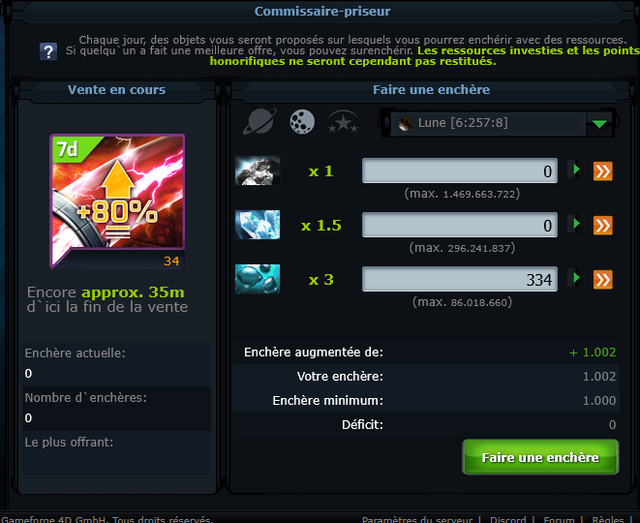
    SoNiC_enchère adds keyboard shortcuts to the OGame auctioneer page for quick manual interaction with the existing resource controls and bid button.

    It is an adaptation of the previously used "OGame Auction Hotkeys" userscript by Kaori00, which stopped working after the v13 update.

    Complete Feature List

    • Q → Set metal bid to maximum
    • W → Set crystal bid to maximum
    • E → Set deuterium bid to maximum
    • R → Click the "Place Bid" button
    • Ignores shortcuts when Ctrl, Alt or Meta/Cmd are pressed
    • Ignores shortcuts while typing in input, textarea or select fields
    • No automatic bidding
    • No timers, loops or background actions

    API Usage

    No.

    The tool does not use the OGame API or external/in-game endpoints.

    It only interacts with existing HTML elements on the auctioneer page when the user manually presses a configured key.

    UI Modifications

    The tool does not add or modify any visible UI elements.

    It only provides keyboard shortcuts for existing auctioneer controls.

    Screenshots / Demo

    A screenshot of the OGame auctioneer page showing the existing resource controls and bid button is provided.

    The script can be tested manually by the reviewer using the source code below.

    Working demo: The script is currently available for testing via the source code provided below. It is not publicly hosted yet, pending review.

    Installation Instructions

    1. Install Tampermonkey in a supported desktop browser.
    2. Create a new userscript.
    3. Copy the source code below into the userscript editor.
    4. Save and enable the script.
    5. Open the OGame auctioneer page.
    6. Press Q, W, E or R to trigger the corresponding manual action.

    Data Handling / Privacy

    • Does not store user data locally.
    • Does not send data to external servers.
    • Does not use analytics or telemetry.
    • Does not collect or transmit personal or game data.

    Source Availability

    Open Source

    The complete, unminified source code is provided below.

    Changelog

    Version 1.0.0

    Added:

    • Q shortcut for maximum metal
    • W shortcut for maximum crystal
    • E shortcut for maximum deuterium
    • R shortcut for manually placing a bid

    Changed:

    • Adapted the original Auction Hotkeys userscript to the OGame v13 auctioneer page structure and URL.

    Fixed:

    • Restored auctioneer keyboard shortcuts after the v13 update.

    Removed:

    • None

    Compliance Declaration

    I confirm that this tool:

    • Does not automate gameplay
    • Does not place bids automatically
    • Does not use timers, loops or background automation
    • Does not provide forbidden functionality
    • Does not use OGame API data
    • Does not exceed permitted API usage
    • Complies with the current OGame Origin tool guidelines

    Source Code