
OGame Nexus v1.3.0 is now released on Chrome and Firefox with Project Orion support!
Feature discussions can be had more easily on: https://discord.gg/Jm4haETTYp
Here are some screenshots of the feature: 
Posts by uppermosteN
-
-
OGame Nexus — Update v1.2.9 Changelog
Feature 1: Note Taking for Coordinates and Players
- What it does: Allows players to click any slot position number in the galaxy view to open a notes window where they can write, tag, view, and delete personal notes for that coordinate or player.
- Information accessed/collected: Note text entered by the user, selected note tag, and the target coordinate and player name.
- Source: User input and text already displayed on the open galaxy page.
- Background requests / polling: None. Operates only on click.
- External transmission: None by default (saved locally in browser storage). Can only be synced if the user manually triggers their private Vault backup in settings.
- Automated actions / alarms / webhooks: None.
- UI/Workflow changes: Makes the slot numbering column in the galaxy view clickable and displays a subtle accent on numbers that have saved notes. Does not replace or shortcut any game actions.
Feature 2: Alliance Top & Flop of the Day
- What it does: Provides a 24-hour score progression overview for alliance members (showing top gainers and drops) inside the extension dashboard, with an option to generate a shareable image card for Discord.
- Information accessed/collected: Public highscore points and member rosters.
-
Source: Official Gameforge public universe XML API (
api/highscore.xmlandapi/alliances.xml). - Background requests / polling: No game polling from the user's browser.
- External transmission: Sends alliance ID and universe ID to fetch public score calculations from the backend.
- Automated actions / alarms / webhooks: Allows the user to share the generated summary card to a Discord webhook if configured. No automated game actions.
- UI/Workflow changes: Adds a dedicated rankings view inside the extension dashboard. Does not modify in-game pages.
Feature 3: Empire Daily Yield Customizations
- What it does: Allows players to toggle which resource sources (mines, plasma technology, lifeforms, booster items) to include in their daily empire yield estimates and adjust the scrap recovery percentage slider.
- Information accessed/collected: User configuration settings (checkbox states and slider percentage).
- Source: Direct user input inside the dashboard.
- Background requests / polling: None.
- External transmission: None (calculated 100% locally).
- Automated actions / alarms / webhooks: None.
- UI/Workflow changes: Adds filter checkboxes and a slider inside the extension dashboard empire view. Does not alter game pages.
Feature 4: Universe Map to Heatmap Deep Links
- What it does: Allows clicking player names or coordinates within the extension's Universe Map to navigate directly to their activity heatmap view.
- Information accessed/collected: Player ID and coordinates.
- Source: Already-cached galaxy data stored locally from past browsing.
- Background requests / polling: None.
- External transmission: None.
- Automated actions / alarms / webhooks: None.
- UI/Workflow changes: Dashboard-only navigation link. Does not alter the game interface.
Bug Fixes & Compatibility Adjustments
- Multi-Extension Compatibility: Corrected activity marker and status tag reading in the galaxy view when running alongside other tools like OGLight to prevent display errors.
- In-Game Changelog Tab: Added a one-time "NEW" badge on the in-game Nexus tab inside the Messages menu that disappears after being clicked.
-
Nexus resyncs data automatically when you browse through the game. You can manually re-sync data from Nexus Terminal (button at the top right). If you need further help, please join https://discord.com/invite/Jm4haETTYp and I will help you!
-
Contents [Hide]
OGame Nexus — Tolerated Tools Update Log
Version 1.2.8
🚀 New Features
1. Overwatch Universe Baseline Map (Closed Beta)
- What it does: When a player creates a new alliance Overwatch network, the map starts with public galaxy coordinates, planets, and player tags already visible.
- Information accessed/collected: Public galaxy coordinates, planet names, player names, and alliance tags.
-
Source of information: Official Gameforge public universe XML feeds (
serverData.xml,universe.xml,players.xml,alliances.xml). - Background requests / polling: A one-time initial download of public Gameforge XML data by the sync server when a new alliance network is created. No background polling or in-game client requests.
- Transmitted to external services: Public universe coordinates are stored on the alliance network database for member map viewing.
- Automated actions / alarms / webhooks: None.
- Changes / shortcuts / replaces OGame UI: None. Only displayed inside the extension's Overwatch Universe Map tab.
2. In-Game Overwatch Access Request & Alliance Setup
- What it does: Allows players without an alliance network to request Closed Beta access directly in-game, and allows leaders to customize their alliance tag during setup.
- Information accessed/collected: In-game player name, universe ID, chosen alliance tag, and optional user notes.
- Source of information: User input in the request form and universe ID from the current page URL.
- Background requests / polling: A single request sent only when the player clicks the "Submit Request" button. No background polling.
- Transmitted to external services: Sent to the developer backend and posted to an admin Discord channel to verify and approve beta whitelist access.
- Automated actions / alarms / webhooks: Webhook notification to the developer team Discord for access review.
- Changes / shortcuts / replaces OGame UI: Adds an access request form inside the extension's Overwatch onboarding screen. Does not alter any native OGame page or workflow.
3. Redesigned Update Center Support Banner
- What it does: Replaces the old bottom donation box with a compact, expandable top banner inside the extension's Update Center tab, showing links for optional donations and official Gameforge partner registration.
- Information accessed/collected: None.
- Source of information: Static extension text and links.
- Background requests / polling: None.
- Transmitted to external services: None.
- Automated actions / alarms / webhooks: None.
- Changes / shortcuts / replaces OGame UI: Displays only inside the extension's custom "OGNexus" tab in the in-game message board. Does not modify native OGame message tabs.
🛡️ Bug Fixes & Adjustments
- Costs Planner multi-account cloud sync: Fixed an issue where shopping cart items from one account could mix into another account during cloud backup. Carts are now strictly kept separate per player.
- Costs Planner lifeform levels: Building calculations now correctly read your planet's actual lifeform levels instead of test defaults.
- Building & research names: Corrected translated names across all 12 languages to match official in-game names.
- Language selection: Fixed language settings to update instantly and remember user selection across sessions.
Version 1.2.7
🚀 New Features
1. Multi-Language Support (12 Languages)
- What it does: Allows players to switch the extension interface between 12 languages (EN, DE, FR, RO, PL, NL, ES, IT, RU, TR, PT, PT-BR).
- Information accessed/collected: Selected language preference.
- Source of information: User selection via dropdown or automatic detection from server link.
- Background requests / polling: None.
- Transmitted to external services: None (stored locally in browser storage).
- Automated actions / alarms / webhooks: None.
- Changes / shortcuts / replaces OGame UI: Adds a small language dropdown to the extension header and update tab. Does not change native OGame interface or workflow.
2. Costs Planner: All-Planets Upgrade & Cart Editing
- What it does: Adds convenience calculation buttons to add building upgrades across all colonies at once, and allows editing target levels directly in the planner cart.
- Information accessed/collected: Current building levels and user-selected target levels.
- Source of information: Existing locally cached planet data from normal page visits, and user clicks.
- Background requests / polling: None.
- Transmitted to external services: None (or optional private cloud vault if user enabled cloud sync).
- Automated actions / alarms / webhooks: None. No automated building or game interaction.
- Changes / shortcuts / replaces OGame UI: Extension dashboard calculation tool only. Does not automate or alter in-game building queues.
3. Astrophysics Payback Calculator
- What it does: Calculates estimated payback time and return on investment for unlocking new colony slots through Astrophysics in the Amortization tool.
- Information accessed/collected: Current mine levels, daily production numbers, and Astrophysics tech level.
- Source of information: Existing locally stored empire statistics.
- Background requests / polling: None.
- Transmitted to external services: None.
- Automated actions / alarms / webhooks: None.
- Changes / shortcuts / replaces OGame UI: Client-side math displayed only inside the extension dashboard.
4. Scrap Merchant Calculator Update
- What it does: Previews estimated resource returns when scrapping ships and defense, including fleets currently in flight.
- Information accessed/collected: Fleet and defense counts.
- Source of information: Locally cached empire fleet data.
- Background requests / polling: None.
- Transmitted to external services: None.
- Automated actions / alarms / webhooks: None. Does not interact with or automate the in-game Scrap Merchant.
- Changes / shortcuts / replaces OGame UI: Extension dashboard display only.
🛡️ Bug Fixes & Adjustments
- Sensor Phalanx display: Fixed moon count and sensor scan range radius calculation on circular universes.
- Overwatch live feed: Corrected alerts for new colonies, moons, and player class tags.
-
OGame Nexus — Version 1.2.6 Changelog
Feature 1: Multi-Account Support & Isolation
- What the feature does from a user perspective: Allows players who play on multiple universes or accounts to switch between them seamlessly in the extension dashboard. Each account maintains separate local data, settings, and alliance connections. In-game page views (galaxy, empire, messages) automatically recognize which account is active and never mix data across accounts.
- What information it accesses or collects: The universe identifier and player ID.
- Where that information comes from: Existing standard page meta tags (ogame-universe and ogame-player-id) and the local browser database.
- Whether new background requests, polling, or automated data collection are introduced: No. No new requests or polling are introduced.
- Whether any information is transmitted to external services or databases: No. Account organization and separation take place entirely within the user's local browser database.
- Whether the feature performs automated actions, notifications, alarms, webhooks, or similar functionality: No automated actions are performed.
- Whether the feature changes, shortcuts, or replaces parts of the normal OGame user interface or workflow: No. It operates strictly within the extension's standalone dashboard.
Feature 2: Per-Resource Payback Filters (Amortization)
- What the feature does from a user perspective: Adds filter buttons to the extension's existing Payback Calculator, allowing players to calculate the investment return of building and mine upgrades for individual resources (Metal only, Crystal only, or Deuterium only) in addition to total combined production.
- What information it accesses or collects: Mine levels and current production rates already saved locally.
- Where that information comes from: Local browser database, saved when the player previously visited their standard Resource Settings and Supplies pages.
- Whether new background requests, polling, or automated data collection are introduced: No. All calculations are performed entirely locally on the user's device.
- Whether any information is transmitted to external services or databases: No.
- Whether the feature performs automated actions, notifications, alarms, webhooks, or similar functionality: No.
- Whether the feature changes, shortcuts, or replaces parts of the normal OGame user interface or workflow: No. It is an offline mathematical calculator inside the extension dashboard.
Feature 3: Circular Universe Distance Calculations
- What the feature does from a user perspective: Corrects flight distance, flight duration, and fuel consumption calculations for universes that have circular galaxies or circular solar systems enabled.
- What information it accesses or collects: Server settings for circular topology (donutGalaxy and donutSystem).
- Where that information comes from: The official public OGame XML server data (serverData.xml).
- Whether new background requests, polling, or automated data collection are introduced: No. Uses server settings already fetched during extension initialization.
- Whether any information is transmitted to external services or databases: No.
- Whether the feature performs automated actions, notifications, alarms, webhooks, or similar functionality: No.
- Whether the feature changes, shortcuts, or replaces parts of the normal OGame user interface or workflow: No. Mathematical calculation used within the extension's planner.
Feature 4: Sensor Phalanx Coverage Map [Closed Beta]
- What the feature does from a user perspective: Displays a map showing which solar systems are within scan range of participating alliance moons with active sensor phalanxes, helping alliance members identify coverage and blind spots.
- What information it accesses or collects: Alliance moon coordinates and sensor phalanx building levels.
- Where that information comes from: Empire information voluntarily shared by participating alliance members who explicitly opt in to the feature.
- Whether new background requests, polling, or automated data collection are introduced: No automated background polling. Data is retrieved only when the user deliberately opens this view in the dashboard.
- Whether any information is transmitted to external services or databases: Moon coordinates and sensor phalanx levels of opted-in members are retrieved from the alliance's secure cloud database.
- Whether the feature performs automated actions, notifications, alarms, webhooks, or similar functionality: No automated actions.
- Whether the feature changes, shortcuts, or replaces parts of the normal OGame user interface or workflow: No. It is an informational visualization map in the extension dashboard.
Feature 5: Universe Intel Unread Counter [Closed Beta]
- What the feature does from a user perspective: Displays a small unread number badge on the Universe Intel tab in the extension dashboard so players know if new alliance activity events have occurred since they last checked the tab.
- What information it accesses or collects: The timestamp of when the player last opened the Intel tab.
- Where that information comes from: Local browser storage.
- Whether new background requests, polling, or automated data collection are introduced: No new requests.
- Whether any information is transmitted to external services or databases: No.
- Whether the feature performs automated actions, notifications, alarms, webhooks, or similar functionality: No. Purely a visual badge inside the extension interface.
- Whether the feature changes, shortcuts, or replaces parts of the normal OGame user interface or workflow: No.
Bug Fixes & Refactoring
- Interface Stability: Added isolated error boundaries to each dashboard view to ensure a rendering error in one view never affects the rest of the application.
- Alliance Comparison Guard: Fixed an issue where the 1-on-1 member comparison view would fail if fewer than two members were selected.
- Highscores Refresh: Fixed an issue where player highscore rankings did not refresh when changing selected players in the comparison view.
- Galaxy Event Filtering: Refined galaxy activity detection to prevent false status notifications on abandoned planets and accounts in vacation mode.
-
OGame Nexus — Changelog v1.2.5
📌 Summary of Release
This update introduces the closed beta test for the alliance collaboration suite (Nexus Overwatch), adds an offline Research Time Optimizer to the dashboard, and includes refinements to the Costs Planner, visual compatibility improvements, and asset updates.
Feature 1: Nexus Overwatch (Closed Beta Testing)
Notice: Nexus Overwatch is currently in Closed Beta for internal testing within select alliance testers and is not yet open to the general public.
-
What the feature does from a user perspective:
Allows authorized alliance members to collaborate by sharing empire statistics (building levels, fleet counts, research, and production yields with customizable privacy sliders) and viewing combined galaxy intelligence (scanned solar system coordinates, activity timestamps, and inactive planet lists). -
What information it accesses or collects:
- The player’s own planet/moon coordinates, facility levels (robotics, shipyard, research lab, phalanx, jump gate), lifeform building levels, and active character class bonuses (only what the user chooses to share via privacy settings).
- Galaxy coordinates, player names, alliance tags, player status indicators (inactive, vacation), and debris field sizes when viewing the galaxy.
- Basic summary data from espionage messages (resources and fleet counts) opened by the player.
-
Where that information comes from:
- Standard in-game pages viewed manually by the player (Empire view, Galaxy page, and Messages tab).
- Official public Gameforge universe API XML files (for baseline server slot data).
-
Whether new background requests, polling, or automated data collection are introduced:
- No automated page scraping or polling of Gameforge servers. Data is collected strictly when the player manually navigates to a page in their browser.
- The newly requested
alarmsbrowser permission is used solely as a local background timer to sync cached data between the extension and the alliance database at regular intervals.
-
Whether any information is transmitted to external services or databases:
- Yes. Shared alliance data (scanned galaxy coordinates, player activity timestamps, and empire stats chosen by the user) is encrypted and sent to a dedicated Cloudflare Worker backend and stored in a secure Cloudflare D1 database.
- No account credentials, passwords, or Gameforge session cookies are ever accessed or sent.
-
Whether the feature performs automated actions, notifications, alarms, webhooks, or similar functionality:
- No automated gameplay actions. The tool cannot click buttons, build buildings, send fleets, or interact with the game on behalf of the player.
- It does not trigger automated in-game alerts or external webhooks.
-
Whether the feature changes, shortcuts, or replaces parts of the normal OGame user interface or workflow:
- Does not replace or automate any standard gameplay workflows or fleet dispatch screens.
- Displays a non-intrusive alliance badge next to alliance mates in the galaxy view and adds a top navigation shortcut button leading to the standalone Nexus dashboard.
Feature 2: Research Time Optimizer
-
What the feature does from a user perspective:
An offline planning calculator that shows exact research completion times and calculates the most resource-efficient upgrade path between Research Labs and the Intergalactic Research Network (IRN). -
What information it accesses or collects:
Existing research lab levels across planets and current research levels. -
Where that information comes from:
Previously cached local browser storage from standard manual page visits, or manual user input. -
Whether new background requests, polling, or automated data collection are introduced:
No. -
Whether any information is transmitted to external services or databases:
No. All calculations run strictly inside the player's local browser. -
Whether the feature performs automated actions, notifications, alarms, webhooks, or similar functionality:
No. -
Whether the feature changes, shortcuts, or replaces parts of the normal OGame user interface or workflow:
No. Functions strictly within the standalone Nexus dashboard.
🔧 Bug Fixes & Adjustments
- Costs Planner & Production Yield Engine: Refined payback period (ROI) and amortized yield calculations for mine upgrades, accounting for plasma tech, server speed formulas, and lifeform production bonuses. All calculations run strictly locally with zero external network traffic.
- Visual Compatibility: Resolved visual styling conflicts with popular third-party extensions (e.g., OGLight) in the galaxy view.
- Asset Upgrades: Updated high-resolution icons for lunar facilities, jump gates, and lifeform buildings.
- Storage Optimization: Improved IndexedDB local caching routines for faster dashboard loading times.
-
What the feature does from a user perspective:
-
OGame Nexus v1.2.3 — Changelog & ToolDev Compliance Declaration
1. New Features & Telemetry Additions
🔹 Feature 1: Multi-Page Message Scanning (Expeditions, Lifeform Discoveries, Combat Reports)
- User Perspective: When the player opens their Expeditions, Lifeform Discoveries, or Combat Reports tab, pending message pages are imported and displayed directly without requiring manual pagination clicks.
- Information Accessed: window.ogame.messages.content & standard in-game message text, loot amounts, fleet losses, and discovery results.
-
Information Source: OGame’s standard message HTML response (
page=messages). - Requests / Polling: Triggered only upon user navigation to the messages tab; no continuous background polling.
-
External Transmission: None. All parsed records are saved exclusively in local browser storage (
IndexedDB). - Automated Actions: None. No automatic message deletion, sending, or interactions.
- Workflow Impact: Read-only display convenience; does not bypass or automate gameplay.
🔹 Feature 2: Full Moon Synchronization
- User Perspective: Synchronizes moon resources, stationed fleets, defenses, lunar base levels, sensor phalanx, jump gates, and active item boosters alongside planet data.
- Information Accessed: Fetch APIs, building levels, stationed ship/defense quantities, and resource totals on the player's own moons.
-
Information Source: Existing OGame planet/moon sidebar DOM elements and standard user-initiated empire sync (
component=overview/page=ingame). - Requests / Polling: Runs only during user-initiated or active navigation syncs (throttled).
- External Transmission: None. All data remains strictly local.
- Automated Actions: None. Purely informational.
- Workflow Impact: Extends dashboard overview visibility to include lunar infrastructure.
🔹 Feature 3: Production % & Crawler Settings Scraper
- User Perspective: Accurately calculates metal, crystal, deuterium, energy, and crawler production yields inside the Nexus Terminal Production tab when percentage sliders (e.g. 150% crawler overload) are adjusted.
-
Information Accessed: Production percentage values (
0%to150%) for mines, solar plant, fusion reactor, solar satellites, and crawlers. -
Information Source: In-game Resource Settings page (
component=resourcesettings). - Requests / Polling: None; scraped directly from the active DOM when the player visits the Resource Settings page.
- External Transmission: None.
- Automated Actions: None. No automatic changing of slider settings.
- Workflow Impact: Read-only math calculation for production yield display.
🔹 Feature 4: Live In-Game Queue Countdowns & Timer Offset Calibration

- User Perspective: Displays live countdown timers on active construction and research queues in the Amortization dashboard, synchronized with server time.
- Information Accessed: Completion timestamps and item names from the player's active construction queues.
-
Information Source: OGame AJAX production queue component (
component=productionqueue). - Requests / Polling: Throttled (1-minute cooldown), triggered on page load.
- External Transmission: None.
- Automated Actions: None.
- Workflow Impact: Read-only display of countdown timers.
🔹 Feature 5: Overseer Mouse Wheel Navigation & In-Game Changelog Tab

- User Perspective: Allows scrolling mouse wheel over the Overseer alert bar to cycle through informational reminders, and adds an in-game "Changelog" tab to the Messages interface.
- Information Accessed: Local extension changelog text and cached alert list.
- Information Source: Extension internal package files.
- Requests / Polling / External Transmission: None.
- Automated Actions / Workflow Impact: Pure UI/visual navigation only.
2. Bug Fixes & Refactoring (Summary)
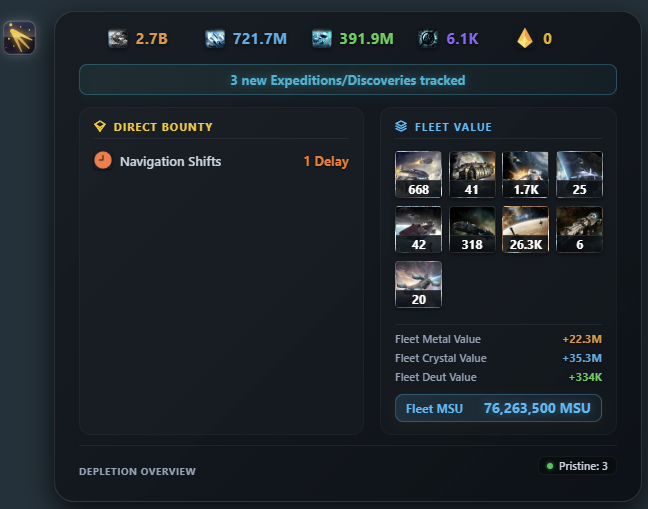
- Direct Bounty Breakdown: Added missing Trader encounters, navigation delays/speedups, discovered items, and combat reports into the expanded Direct Bounty view.
- Cross-Account Speedup Isolation: Resolved inventory leakage across multiple account tabs.
- Rolling Daily Yield: Added dynamic divisor for accounts with fewer than 7 days of tracked data.
- Service Worker Bridge: Added retry backoff to handle background service worker wake-up latency.
-
OGame Nexus v1.2.2 — Tolerated Tools Changelog
New Features & Behavioral Audits
- Overseer Planet To-Dos (Localized ROI Recommendations)
• User Perspective: Displays the top 3 highest-ROI building or technology upgrades specifically for the planet the player is currently viewing.
• Information Accessed: Active planet coordinates, building levels, and local amortization calculations.
• Information Source: Local browser IndexedDB and active page context.
• Background Requests / Polling: None. Evaluated synchronously when viewing the Overview page.
• External Transmission: None. All calculations are client-side.
• Automated Actions / Alarms / Webhooks: None. Passive recommendations only.
• OGame UI / Workflow Alterations: None. Displayed in the existing Nexus Overseer bar.
2. Overseer Header Category Navigation Pills
• User Perspective: Shows compact status pills with notification counters for each category; clicking jumps directly to that category tab in the Overseer modal.
• Information Accessed: In-memory counts of active local notifications.
• Information Source: Extension memory state.
• Background Requests / Polling: None.
• External Transmission: None.
• Automated Actions / Alarms / Webhooks: None.
• OGame UI / Workflow Alterations: None.
3. Costs Planner Completion Date/Time Tooltip
• User Perspective: Hovering over the info icon on "Estimated Gather Time" shows the projected future day, hour, and minute when resources will be ready.
• Information Accessed: Cart cost, stored/flying resources, and empire daily production.
• Information Source: Local IndexedDB.
• Background Requests / Polling: None. Calculated mathematically on-the-fly.
• External Transmission: None.
• Automated Actions / Alarms / Webhooks: None. Passive tooltip.
• OGame UI / Workflow Alterations: None.
4. Automatic Background Sync for Non-Commander Accounts
• User Perspective: Automatically keeps local empire data synchronized while the player is active, removing the previous "Manual Sync Only" limitation.
• Information Accessed: Standard account info, research levels, buildings, and resources.
• Information Source: Gameforge accountInfo JSON endpoint using the player's active session.
• Background Requests / Polling: Throttled passive fetch triggered only when the player is active and data is stale (>5 min).
• External Transmission: None. Stored only in local IndexedDB.
• Automated Actions / Alarms / Webhooks: None. Read-only data sync.
• OGame UI / Workflow Alterations: None.
Bug Fixes & Visual Adjustments
• Lifeform Building Cost Calibration: Corrected base costs and exponential formulas for all 48 Lifeform buildings in Costs Planner to match official LFMaster 9.0.3 data.
• Exposed Goods Threat-Level Colors: Added chromatic threat-level scaling (blue to red) based on exposure across all empire locations.
• Moon Amortization Fix: Prevented invalid mine upgrade alerts on moons.
• Import/Export Link: Fixed broken navigation link in the Overseer bar.
• Fleet Telemetry: Corrected in-flight fleet percentages and account fleet detection.
• Table Layout Polish: Widened the Terminal Totals first column to 312px and centered all Costs Planner ledger cells.
-
Contents [Hide]
OGame Nexus - Version 1.2.1 Changelog
Release Version: 1.2.1
Target Platform: OGame (Compatible with OGame V13)
FEATURE 1: Nexus Overseer In-Game Assistant & Alert Bar (BETA)
• What the feature does from a user perspective: Injects an informational overview bar and interactive summary modal onto the in-game Overview page. It alerts the player to idle production/shipyard queues, idle research labs, stationary fleets left without fleetsave, unboosted high-level mines when booster items exist in inventory, Lifeform artifact collection caps , spotted galaxy debris opportunities, and ROI amortization recommendations. Players can snooze/mute specific alert categories or disable the bar entirely.
• What information it accesses or collects: Planet building levels, laboratory research status, current active production queues, inventory item counts, active fleet movement timestamps, spotted debris fields, and Lifeform artifact counts.
• Where that information comes from: Local browser cache (IndexedDB / chrome.storage.local) gathered during normal user navigation across standard game pages (Overview, Supplies, Facilities, Research, Inventory, Fleet, Galaxy) and DOM metadata on the active page.
• Whether new background requests, polling, or automated data collection are introduced: None. No automated HTTP requests or polling intervals are introduced. Evaluations execute purely locally against existing stored data when the Overview page is rendered or updated.
• Whether any information is transmitted to external services or databases: None. All data is processed and stored 100% locally in the player's browser.
• Whether the feature performs automated actions, notifications, alarms, webhooks, or similar functionality: None. Does not perform automated gameplay actions, background alarms, or webhooks. All suggestions are passive visual cues with standard navigational links (e.g. clicking "Open Research" navigates to the standard research page URL).
• Whether the feature changes, shortcuts, or replaces parts of the normal OGame user interface or workflow: Injects a collapsible informational box below the planet box on the Overview page. The Overseer bar can be completely turned off at any time in Nexus Settings or from the in-game modal.
FEATURE 2: 10-Fit Horizontal Expedition & Lifeform Results View (BETA)
• What the feature does from a user perspective: Adds an optional 10-column compact card layout inside the Messages > Expeditions tab, displaying expedition finds, Lifeform discovery outcomes, depletion indicators, and quick-action favorite/delete controls. Empty/failed missions display clean styling without text clutter.
• What information it accesses or collects: Expedition and Lifeform message outcome parameters (resource quantities, ships found, item drops, depletion rating, coordinates, timestamps).
• Where that information comes from: Existing in-game HTML attributes (.rawMessageData) already delivered by the OGame server on the loaded messages page.
• Whether new background requests, polling, or automated data collection are introduced: None. Only parses messages currently present in the active page DOM.
• Whether any information is transmitted to external services or databases: None.
• Whether the feature performs automated actions, notifications, alarms, webhooks, or similar functionality: None. Favorite and Delete buttons trigger the game's standard native click handlers (.msgFavouriteBtn / .msgDeleteBtn) only upon manual user interaction.
• Whether the feature changes, shortcuts, or replaces parts of the normal OGame user interface or workflow: Adds a view mode switcher ("Standard List" vs "10-Fit Bar") above the expedition message list. This feature is default OFF and must be explicitly enabled by the user in Nexus Settings.
FEATURE 3: Cosmic Black Hole Animation Restyle
• What the feature does from a user perspective: Replaces the generic pink loot wave on expedition total fleet loss messages with a dedicated crimson/dark-matter event-horizon animation.
• Technical & Compliance: Pure CSS visual update. No data collection, network requests, or workflow modifications.
BUG FIXES & INTERNAL MAINTENANCE
• Context Invalidation Handling: Silently suppressed "Extension context invalidated" console logs during background extension updates to prevent false-positive error badges in the browser.
• Typography & Layout Alignment: Corrected line-height and descender clearance (y, g, p) on in-game notification text; aligned metallic corner brackets of some Nexus UI elements flush with native OGame UI containers.
• Background Telemetry Sync: Synchronized cached inventory items and empire production queue objects into local storage state.
-
OGame Nexus - Version 1.2.0 Changelog
Release Version: 1.2.0
Target Platform: OGame (Compatible with OGame V13)
NEW FEATURES & CHANGES
- OGame V13 Compatibility & Background Synchronization
- User Perspective: Updates DOM selectors and background synchronization handlers to maintain full compatibility with OGame Version 13 (v13), ensuring seamless data display across planet overviews, fleet dispatches, and lifeform pages.
- Information Accessed / Collected: Standard planet metadata (mine levels, active booster items, storage capacities, fleet events, and lifeform setups).
- Information Source: DOM elements passively read from active OGame tabs during normal user navigation.
- Background Requests, Polling & Data Collection: None. No automated background HTTP requests, API polling, or automated server requests are introduced. Data parsing is triggered only when the user opens or navigates game pages.
- External Transmission: None. All parsed telemetry remains strictly stored in the browser's local IndexedDB instance.
- Automated Actions / Webhooks: None. Performs no automated gameplay actions, automated fleet movements, or external webhooks.
- UI & Workflow Modifications: Renders informational data overlay cards on OGame pages. Does not block, replace, or alter any native OGame buttons, controls, or action workflows.
- Raid Radar Targets Backup Export & Import
- User Perspective: Enables players to export their saved Raid Radar targets to a local JSON file for backup, and import them into another browser or installation.
- Information Accessed / Collected: User-saved target coordinates, player names, and custom target notes.
- Information Source: Local browser IndexedDB storage (db.raidTargets).
- Background Requests, Polling & Data Collection: None.
- External Transmission: None. Export downloads a local file to the user's device; import reads a local file supplied by the user. No data is sent to external servers.
- Automated Actions / Webhooks: None.
- UI & Workflow Modifications: Adds Export and Import buttons inside the extension's standalone Raid Radar dashboard view. Does not alter native OGame pages.
- Dashboard Lifeform Overview & Telemetry
- User Perspective: Displays active Lifeform species, building levels, and research bonus summaries in the extension's main Dashboard tab.
- Information Accessed / Collected: Active planet Lifeform ID, building levels, selected tech slots, and research levels.
- Information Source: OGame DOM elements parsed during normal player visits to planet and Lifeform overview pages.
- Background Requests, Polling & Data Collection: None.
- External Transmission: None.
- Automated Actions / Webhooks: None.
- UI & Workflow Modifications: Adds an informational summary section to the extension's external dashboard UI.
BUG FIXES & VISUAL ADJUSTMENTS
- Expedition Calculator: Included Destroyers (213) and Reapers (218) in maximum potential findable ship calculations. Corrected active booster deduplication logic so higher-tier boosters (e.g. +25%) properly supersede lower-tier boosters without double-counting, and added live duration countdown formatting.
- Discoverer Optimizer: Fixed colony list rendering to display all future colonies beyond the previous 3-colony cap.
- Amortization & ROI Matrix: Integrated Mineral Research Center building effects into payback estimations and corrected ROI calculations for high-level tech upgrades.
- Universal Lifeform Sync: Lifeform planet assignments are now cached dynamically from any page visit instead of requiring an explicit visit to the Overview page.
- Terminal Production View: Added current planetary mine levels directly to the Terminal Production tab and fixed Dark Matter booster item icon paths.
- Multi-Language Fleet Tracking: Updated flying resource regex parsers to ensure compatibility across all non-English OGame server domains.
- Asset & Mapping Fixes: Corrected tech name mapping for Kaelesh Discoverer Enhancement and restored missing defense icons across Lifeform screens.
-
Contents [Hide]
OGame Nexus v1.1.7 — Tolerated Tools Changelog
New Features & Behavioral Audits
1. Automatic Inactive Planet Clean-up (Raid Radar DB Maintenance)
- User Perspective: Stale inactive target coordinate entries (Raid Radar) that have relocated, deleted their accounts, or had their planets destroyed are automatically removed from the local database.
- Information Accessed: Galaxy coordinate slots, player cells, and loaded planet classes in the active view.
- Information Source: Read from the loaded OGame Galaxy view page DOM.
- Background Requests / Polling: None. Runs passively and synchronously only when the user is actively viewing a galaxy system.
- External Transmission: None. All database modifications happen locally inside the extension client via standard IndexedDB calls.
- Automated Actions / Alarms / Webhooks: None.
- OGame UI / Workflow Alterations: None. Does not alter, automate, or shortcut any OGame UI workflow.
2. Flying Resources Database Sync
- User Perspective: Fleet cargoes currently in flight are recorded in the dashboard database to provide more accurate resource aggregates and production estimates.
- Information Accessed: In-flight fleet cargo contents (Metal, Crystal, Deuterium, Food).
- Information Source: Read from the OGame Event List sidebar.
- Background Requests / Polling: None. Scraped passively when the native OGame interface updates the event list.
- External Transmission: None. Saved locally in IndexedDB.
- Automated Actions / Alarms / Webhooks: None.
- OGame UI / Workflow Alterations: None.
3. Dynamic Dashboard Tab Naming
-
User Perspective: The extension tab title dynamically displays the active player name and universe (e.g.
Lyra › LazyOldWoman • OGNexus), updating immediately if the user switches accounts. - Information Accessed: Active player name and universe metadata.
-
Information Source: Read from the native OGame metadata tags (
ogame-universe-name, etc.) in the document header. - Background Requests / Polling: None.
- External Transmission: None.
- Automated Actions / Alarms / Webhooks: None. Updates the browser window title locally.
- OGame UI / Workflow Alterations: None.
4. Customizable Row Dragging Configuration
- User Perspective: Adds a settings toggler to customize or disable the manual drag-and-drop planet reordering layout inside the dashboard interface.
- Information Accessed: User settings selection.
- Information Source: User input via the dashboard Settings view.
- Background Requests / Polling: None.
-
External Transmission: None. Saved locally in
chrome.storage.local. - Automated Actions / Alarms / Webhooks: None.
- OGame UI / Workflow Alterations: None.
🔧 Bug Fixes, Visual Adjustments & Refactoring
The following items are internal or visual in nature and do not alter the behavior relevant to the toleration review:
-
Galaxy Limits Bugfix: Fixed an issue where the Raid Radar filters were locked to 5 galaxies; it now dynamically queries the database for the active account's total server galaxies (retrieved via
/api/serverData.xmlAPI) to support up to 9 galaxies. - Lifeform Sync Bugfix: Resolved a bug where active planet lifeforms levels and slot data were corrupted or forgotten on partial sync updates.
- Trader Message Parsing Bugfix: Corrected event log regex matching to prevent errors when parsing trader classes or specific cargo rewards in expedition tables.
- Visual Overhaul: Redesigned dashboard feed visualizers for expeditions, combat, and lifeform telemetry reports to prevent layout shifting.
- Dark Matter Item ID Mapping Refactoring: Migrated static items dictionary mapping from localized string names to static item ID numbers.
- Performance Tuning: Decreased local session background sync delays to 1 minute (down from 5 minutes) to ensure faster dashboard reactivity while playing.
-
Contents [Hide]
Developer Changelog - OGame Nexus v1.1.6
This version introduces minor visual updates, calculation improvements, and bug fixes without introducing any new tracking, network requests, or data transmission.
1. New Feature: Combat Report Loot Summaries & OGLight Duplicate Hiding
-
What the feature does from a user perspective:
- Displays a visual resource summary pill showing the looted Metal, Crystal, and Deuterium amounts at the top of combat report cards inside the OGame message interface, right next to the existing debris field pill.
- Cleans up duplicate OGLight-injected resource summary cards from the message layout if the user has enabled the "Clean OGLight Duplicate Visuals" option in the Nexus settings.
-
What information it accesses or collects:
- Reads the raw combat metadata.
-
Where that information comes from:
- The combat metadata is parsed directly from DOM elements containing native JSON strings.
- The setting flag is loaded from the extension's local storage.
-
Whether new background requests, polling, or automated data collection are introduced:
- No. The DOM parsing and cleaning run entirely on-demand in the content script when the messages folder is opened. No network requests or polling are initiated.
-
Whether any information is transmitted to external services or databases:
- No. All parsed resource amounts are stored locally in the extension's database (IndexedDB) for local dashboard aggregation and are not transmitted externally.
-
Whether the feature performs automated actions, notifications, alarms, webhooks, or similar functionality:
- No.
-
Whether the feature changes, shortcuts, or replaces parts of the normal OGame user interface or workflow:
- Yes, it visually enhances combat message cards by appending a resource summary pill below the header.
2. Calculation Update: Production Tab Calculation Adjustments
-
What the feature does from a user perspective:
- Increases accuracy of the daily production metrics shown inside the private OGame Nexus dashboard by taking into account the user's advanced resource settings.
-
What information it accesses or collects:
- Reads the user's advanced resource configuration profile.
-
Where that information comes from:
- Local extension storage.
-
Whether new background requests, polling, or automated data collection are introduced:
- No. Formulas are evaluated locally on-the-fly when loading the dashboard.
-
Whether any information is transmitted to external services or databases:
- No.
-
Whether the feature performs automated actions, notifications, alarms, webhooks, or similar functionality:
- No.
-
Whether the feature changes, shortcuts, or replaces parts of the normal OGame user interface or workflow:
- No. It only affects the custom dashboard terminal view and does not touch the normal OGame UI layout.
3. Bug Fixes & Refactoring
-
Background Sync Bugfixes:
- Fixed scheduling and error-recovery edge cases in the background synchronization engine to prevent update stalls. Because of this, users might have encountered data failing to update. No changes were made to permissions, APIs, or data transmission protocols.
-
What the feature does from a user perspective:
-
Contents [Hide]
OGame Nexus Toleration Review & Changelog - v1.1.5
This changelog is structured to assist OGame ToolDevs in assessing whether a review of the new version is required under the toleration guidelines.
1. New Feature: Production Tab (Nexus Terminal)
- User Perspective: Renders a read-only tabular dashboard within the Nexus Terminal overlay showing an empire-wide breakdown of base production rates and active multipliers (Metal, Crystal, Deuterium) for all planets.
- Information Accessed/Collected: Stored mine levels, planetary temperatures, active booster items, active officers/staff, player classes, and active lifeform buildings.
- Source of Information: Extracted locally from standard game page DOMs as the user browse pages (e.g., resources, facilities, lifefoms).
- Background Requests, Polling, or Automated Collection: None. Renders using data already collected and stored locally during normal manual navigation. No background page queries or automated collection loops are introduced.
- External Transmission: None. All production computations and animations are performed 100% client-side.
- Automated Actions, Alarms, or Webhooks: None.
- OGame UI/Workflow Modifications: None. Renders strictly inside the custom, user-toggled OGame Nexus Terminal overlay. It does not replace or inject elements directly into OGame's standard sidebar navigation or modify game pages.
2. New Feature: Costs Planner Accumulation Timer
- User Perspective: Adds a dynamic timer display to the Costs Planner shopping cart, showing the estimated time (days/hours/minutes) needed to naturally accumulate the required resources for the planned queue.
- Information Accessed/Collected: The list of planned items (shopping cart) and the player's total resource production rates.
- Source of Information: Shopping cart values configured manually by the user in the Costs Planner, and production values computed client-side (part of which is described in Feature 1).
- Background Requests, Polling, or Automated Collection: None.
- External Transmission: None. Calculations are processed locally inside the extension.
- Automated Actions, Alarms, or Webhooks: None.
- OGame UI/Workflow Modifications: None. This calculation and display are restricted to the Costs Planner view in the extension dashboard.
3. Stability, Adjustments & Bug Fixes
-
Amortization Engine Refinements:
- Details: Refined mathematical calculations regarding ROI timelines for lifeform researches and mines. Corrected math edge-cases in return-on-investment logic in order to prevent item duplication in the list.
- Toleration Impact: Purely logical math adjustments to client-side calculators; no changes to data collection or game interaction.
-
Background Sync Engine Fixes:
- None.
-
Visual Enhancements:
- Details: Added smooth hover scaling/brightness states to resource cells, centered text alignments, and removed header cell border radii to prevent rendering overlap bugs.
- Toleration Impact: Purely visual layout adjustments to the Production tab inside Nexus Terminal (in-game).
-
OGame Nexus - v1.1.4 Developer ChangelogFeature 1: Raid Helper Sidebar
1. User Perspective
Provides a convenient slide-out sidebar panel integrated directly into the in-game Galaxy View. It aggregates all inactive targets spied in the active galaxy, listing their coordinates, activity status, and color-coded hourly resource production projections. It also displays direct coordinate links and the current status of the player's espionage queue.
2. Information Accessed or Collected
- List of inactive planets/moons in the current system (names, coordinates).
- Calculated hourly production values and estimated loot growth for each target.
- Espionage queue status (active/total fleet slots).
3. Data Source
- Extension's local database (holding previously spied planet metrics).
- Native Galaxy View DOM parameters (for system coordinate references and fleet slots status).
4. Background Requests, Polling, or Automated Data Collection
- None.
5. Transmission to External Services
- None.
6. Automated Actions, Alarms, or Webhooks
- None.
7. Changes to normal OGame UI or Workflow
- Adds a slide-out drawer sidebar button and sidebar panel to the right side of the in-game Galaxy View.
- Does not modify, hide, or intercept any native OGame functions, buttons, or navigation systems.
Feature 2: Automated Background Sync
1. User Perspective
Keeps the player's OGame Nexus database up-to-date automatically during active gameplay. It quietly syncs planet lists, moon coordinates, researches, and active lifeform levels in the background while the player is logged in, eliminating the need to manually click sync buttons on the dashboard. Displays a sync status in the Nexus Terminal (small button to the right of the OGame Nexus ui button).
2. Information Accessed or Collected
- Planet list (coordinates, names, IDs).
- Research levels (global technologies).
- Active lifeform species IDs, lifeform structure/building levels, and technology setups.
- Empire View/Resource Settings/Lifeform Research
3. Data Source
- OGame game pages loaded in the active tab (using AJAX queries to
/game/index.php?page=ajax&component=empire/resourcesettings/lfresearch). - Stored locally in the extension's IndexedDB database.
4. Background Requests, Polling, or Automated Data Collection
- Automatically triggers a background AJAX sync process whenever the player navigates between pages; a 5 minute cooldown is active between consecutive syncs.
5. Transmission to External Services
- None.
6. Automated Actions, Alarms, or Webhooks
- Executes a user-triggered (from page navigation) fetch loop to update internal extension state metrics. No external webhooks or alarms are triggered.
7. Changes to normal OGame UI or Workflow
- Does not alter, block, or delay the player's gameplay or native UI workflow.
-
OGame Nexus - v1.1.3 Developer Changelog
Feature 1: Raid Helper Sidebar
1. User Perspective
Provides a convenient slide-out sidebar panel integrated directly into the in-game Galaxy View. It aggregates all inactive targets spied in the active galaxy, listing their coordinates, activity status, and color-coded hourly resource production projections. It also displays direct coordinate links and the current status of the player's espionage queue.
2. Information Accessed or Collected
- List of inactive planets/moons in the current system (names, coordinates).
- Calculated hourly production values and estimated loot growth for each target.
- Espionage queue status (active/total fleet slots).
3. Data Source
- Extension's local database (holding previously spied planet metrics).
- Native Galaxy View DOM parameters (for system coordinate references and fleet slots status).
4. Background Requests, Polling, or Automated Data Collection
- None.
5. Transmission to External Services
- None.
6. Automated Actions, Alarms, or Webhooks
- None.
7. Changes to normal OGame UI or Workflow
- Adds a slide-out drawer sidebar button and sidebar panel to the right side of the in-game Galaxy View.
- Does not modify, hide, or intercept any native OGame functions, buttons, or navigation systems.
Feature 2: Automated Background Sync
1. User Perspective
Keeps the player's OGame Nexus database up-to-date automatically. It quietly syncs planet lists, moon coordinates, researches, and active lifeform levels in the background while the player is logged in, eliminating the need to manually click sync buttons on the dashboard. Displays a sync status in the Nexus Terminal (small button to the right of the OGame Nexus ui button).
2. Information Accessed or Collected
- Planet list (coordinates, names, IDs).
- Research levels (global technologies).
- Active lifeform species IDs, lifeform structure/building levels, and technology setups.
- Empire View/Resource Settings/Lifeform Research
3. Data Source
- OGame game pages loaded in the active tab (using AJAX queries to
/game/index.php?page=ajax&component=empire/resourcesettings/lfresearch). - Stored locally in the extension's IndexedDB database.
4. Background Requests, Polling, or Automated Data Collection
- Checks sync status every 60 seconds.
- Automatically triggers a background AJAX sync process every 5 minutes if the player is active and has an active tab open.
- Automatically schedules a retry 1 minute later if a sync operation fails (e.g. due to server/session timeout issues).
5. Transmission to External Services
- None.
6. Automated Actions, Alarms, or Webhooks
- Executes an automated fetch loop to update internal extension state metrics. No external webhooks or alarms are triggered.
7. Changes to normal OGame UI or Workflow
- Automates the manual synchronization requirement, ensuring the dashboard displays accurate data.
- Does not alter, block, or delay the player's gameplay or native UI workflow.
-
Contents [Hide]
OGame Nexus - v1.1.2 Changelog
This update introduces the Raid Radar targeting helper, in-game Galaxy View highlights, and At-A-Glance Row Customization.
Feature 1: Raid Radar & Galaxy View Projections
1. User Perspective
Helps players identify, track, and profit from inactive players in their vicinity. When you spy an inactive player, the extension reads their espionage report, estimates their planet's resource production, and projects the accumulated loot since you last spied them. Inside OGame's Galaxy View, yield is shown for inactive target rows. Hovering over them opens a tooltip projecting metal, crystal, and deuterium amounts. A summary bar at the bottom allows you to fade targets below your preferred resource thresholds.
2. Information Accessed or Collected
- Inactive player names, coordinates, and system/galaxy coordinates.
- Espionage report data: Current resource counts, hourly production rates (metal, crystal, deuterium), storage capacity limits, and report timestamps.
- Universe specifications (e.g. number of galaxies).
3. Data Source
- OGame game pages (espionage reports and active Galaxy component DOM).
- OGame's standard public XML server API (
api/serverData.xmlto limit filters to actual galaxy counts). - Stored locally in the browser's database.
4. Background Requests, Polling, or Automated Data Collection
- None.
5. Transmission to External Services
- None.
6. Automated Actions, Alarms, or Webhooks
- None.
7. Changes to normal OGame UI or Workflow
- Adds visual decoration (left-side color-coded border highlight and a hover tooltip) to inactive player rows on OGame's Galaxy component.
- Adds a togglable "System Inactives Summary Bar" at the bottom of the native OGame Galaxy page to filter the opacity of inactive targets. It does not block or replace any native button actions or OGame workflows.
Feature 2: At-A-Glance Row Customization
1. User Perspective
Allows users to custom-tailor the stats totals table inside the Nexus Terminal dashboard and in-game overlays. Clicking a settings cogwheel in the top-left cell opens a configuration list where rows (such as
∑ Today, daily average events, 7-day averages, and 30-day averages) can be checked/unchecked and reordered using drag-and-drop.2. Information Accessed or Collected
- User-specified row order preferences and visibility settings.
3. Data Source
- User input (checkbox toggles and drag-and-drop interactions) inside the configuration modal.
4. Background Requests, Polling, or Automated Data Collection
- None.
5. Transmission to External Services
- None.
6. Automated Actions, Alarms, or Webhooks
- None.
7. Changes to normal OGame UI or Workflow
- Modifies only the extension's custom telemetry table. It does not alter, change shortcuts, or replace any part of the native OGame user interface.
Visual Adjustments & Bug Fixes
-
Retracted Navigation Sidebar: Permanently locked the dashboard sidebar to
80pxwidth. Collapsing chevrons have been removed and replaced with floating hover tooltips showing button names.
-
OGame Nexus v1.1.0
🚀 New Features & Enhancements
- Stellar Hotspots Heatmap: Introduced an interactive galaxy heatmap in the Combats Overview and Zones views with mouse-wheel zoom, drag-to-pan, coordinates ruler, and click-to-drill-down combat logs.
- Combat Reports Bounty Bar: Added a dedicated, real-time updated summary card on the Combat Reports tab displaying daily looted resources, Damage Dealt (losses inflicted on defenders), and Debris Generated, featuring a click-to-clear "New" count badge.
- Segmented Day Timeline: Timeline bars in the At-A-Glance chart are now stacked by event type (Cyan: Expeditions, Orange-Red: Combats, Green: Debris Fields) with updated "Day X: Y Events" tooltips.
- Redesigned Totals Table: Structured and re-ordered the totals table to showcase: Total Today, Avg. Expo. Events, Avg. Combat Events, and Average All Events.
- Expedition Calculator Booster Item: Added an "Expedition Booster item %" field inside the Player Bonuses section to scale calculated resource limits and optimal cargo presets.
- Flying Fleet Progress Bar: Implemented a color-coded progress overlay at the bottom of the fleet movements panel indicating active flying ship percentages and mission types.
- Combat History Filters: Added PVP/PVE filter switchers and 50-item paginated lists for combat history logs.
🛠️ Bug Fixes & Refinements
- Expedition Delay Correction: Fixed navigation delay reduction calculations where delay times reduced to 0 hours (100% delay reduction) were misclassified as speedups.
- Amortization Upgrade Engine: Corrected planet amortization calculations by ignoring placeholder colonizations and correctly referencing levels for upgrades currently in progress.
-
OGame Nexus v1.0.9
🚀 New Features & Enhancements
- Performance Boost: Low Animation Mode: Introduced a global performance toggle that completely turns off background stars, smooth blurs, and other flashy animations. Highly recommended for players experiencing slow speeds or visual lag.
- Enlarge expedition shipwreck: Ship icons inside deep-space expedition findings are enlarged by 25% (45px) alongside cleaner, larger labels (12px) for improved visibility and scanning.
🛠️ Bug Fixes & Refinements
- Optimized Game Sync Engine: The in-game sync engine has been upgraded to run more efficiently, significantly reducing CPU usage during gameplay and active tab observation.
- Clean Developer Console: The developer tools console has been completely cleaned up by silencing unnecessary debug logs and background notification printouts.
-
There's definitely a learning curve switching away from what you have been used to.
-
 Display More
Have you done the Tutorials section inside the extension?
yea done it all.
the point is:
- i am on server 1, klick on nexus button, nexus opens and show me the profile of server 1
- i switch on my server 2 tab, click there on nexus and it opens a new tab with profile of server 2
- when i now switch to tab 1 of nexus, it loads server 2, so i have 2 tabs of nexus with the same profile.
thats not like i want to use it. The tab should stay on the profile i opened it with.
I see now.
That behavior is intended because many players I got feedback from preferred it this way (myself included) - having one Nexus tab that responds to multiple Universes opened at the same time (this was even harder to make possible
 ).
).Regardless, your preferred way of using it also makes sense and I will write this down as an improvement feature in my backlog (add a toggle in the Settings page that would switch between these two behaviors).
Your feedback is great to have and don't hesitate in providing more. Have you had any performance issues so far?
Edit: I've also slightly increased the size of the expedition ships + their number and checked the icon quality; to my eyes, it renders clearer than OGame Tracker. These changes + a Low Animation Mode will be present with the upcoming v1.0.9 release.

